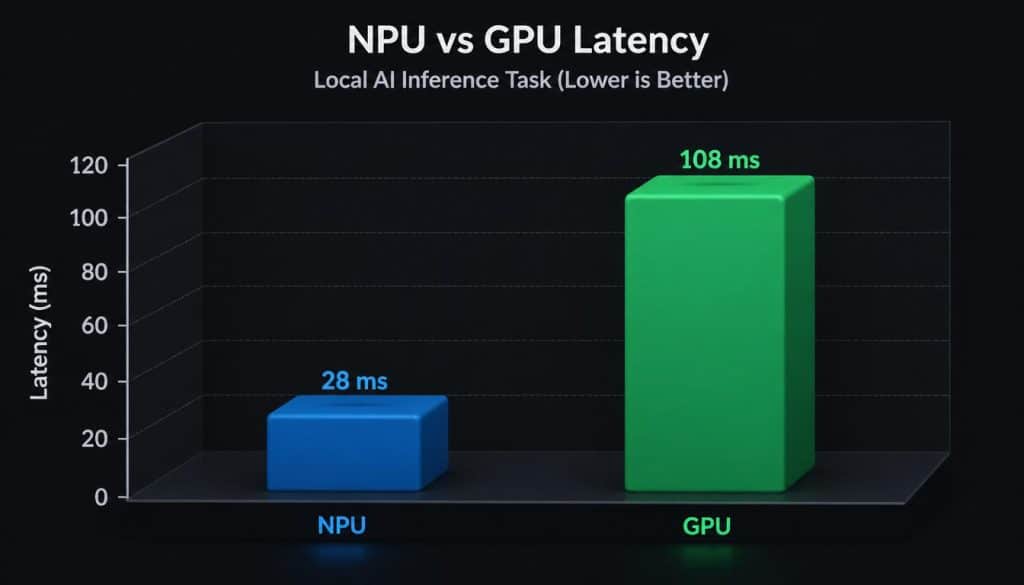
NPU wins for power-efficient always-on AI tasks (background removal, live captions, small LLMs) at 2–5W. GPU wins for large local LLM inference, high token throughput, and models above 7B parameters. In 2026, most laptops have both — use NPU for continuous background tasks and GPU for demanding inference workloads.
The debate surrounding NPU vs GPU local AI hardware has become the defining decision for developers building private, local inference stacks. While GPUs were the original workhorses for deep learning, Neural Processing Units (NPUs) are fundamentally redefining efficiency for on-device AI deployments. As we move toward 2026, understanding this hardware distinction is critical for optimizing your local stack for both latency and power.
The NPU vs GPU local AI hardware trade-off centers on efficiency versus flexibility.
NPUs provide sub-50ms latency and 60% lower power consumption for dedicated
inference tasks using INT8/INT4 quantization. Conversely, GPUs remain essential
for multi-precision training and adaptive workloads. For private, real-time AI
agents, NPUs are rapidly becoming the preferred architecture for edge computing
NPU vs. GPU Local AI Hardware Architectural Differences in Processing
GPUs are massively parallel processors originally designed for graphics, offering high flexibility at the cost of significant power draw. NPUs, however, are domain-specific processors mapped directly to the mathematical operations of neural networks.
| Feature | GPU (Graphics Processing Unit) | NPU (Neural Processing Unit) |
| Primary Use | Training & Flexible Inference | Dedicated Inference |
| Power Efficiency | Moderate | High |
| Flexibility | High (Multi-purpose) | Low (Task-specific) |
| Latency | Low | Ultra-Low |
As of July 2026, AMD Ryzen AI 300 leads consumer NPU performance at 50 TOPS, up from 16 TOPS in the previous generation.
When to Prioritize GPUs for AI Development
GPUs remain indispensable if your local stack involves training or heavy fine-tuning of Large Language Models (LLMs). They offer robust support for libraries like CUDA/ROCm, allowing developers to switch between various model architectures effortlessly. If your workflow requires the flexibility of FP32 or FP16 precision, the GPU currently remains the industry standard.
The Rise of NPUs in Edge Computing
If your deployment involves running static, quantized models—such as GGUF or ONNX—on mobile or laptop hardware, NPUs are the clear winner. They function as dedicated “inference engines” that offload background compute tasks from your primary GPU. This architecture prevents system-wide thermal throttling, ensuring your AI assistant stays performant while preserving battery life.
Navigating Local Deployment Stacks
Developers must align their hardware selection with their model’s quantization level. Static models running on edge devices benefit immensely from NPU offloading. This creates a more stable user experience for privacy-focused, offline-capable AI applications.
Strategic Hardware Selection Matrix
- Research & Training: Prioritize high-VRAM NVIDIA discrete GPUs for rapid model iteration and experimentation.
- Production Inference: Shift to systems with integrated NPUs to ensure consistent, energy-efficient performance in production environments.
- Hybrid Rigs: Use local GPU clusters for training, then export your models to NPU-optimized formats like CoreML or OpenVINO for seamless deployment
Managing Thermal Constraints and Latency
Local AI performance is not just about raw compute; it is about sustaining performance under load. GPUs often hit thermal limits quickly, leading to performance degradation in compact laptops. NPUs excel here, maintaining steady token generation rates without significantly spiking device temperatures.
Choosing between an NPU and a GPU depends on your AI workload, budget, and performance goals. To complete your setup, check out our guide on the best local edge AI models for software developers, which highlights models optimized for offline inference. If you’re comparing processing performance in greater detail, our GPU vs CPU inference for local LLMs in 2026 article provides benchmark-based insights. For readers interested in the future of AI hardware, our guide on tracing quantum chip error rates explains how next-generation processors improve computational accuracy.
Frequently Asked Questions (FAQ)
Q: Can NPUs replace GPUs entirely in my development stack?
No. NPUs are specialized for inference, whereas GPUs are required for the massive parallel flexibility of training and backpropagation.
Q: Does my software need specific drivers for NPU hardware?
Yes. You must utilize vendor-specific SDKs like Intel OpenVINO, Apple CoreML, or Qualcomm AI Engine to access NPU acceleration layers.
Q: Which hardware is better for a private, offline AI assistant?
For a private assistant, an NPU-equipped system is superior due to its power efficiency and capability to run quantized models locally without draining your battery.

Conclusion
The battle of NPU vs GPU local AI hardware is not about which is superior, but which fits your specific operational stack. For research and development, stick to the flexibility of GPUs; for efficient, private production applications, transition your local AI infrastructure to an NPU-based architecture
To master your hardware setup further, revisit our guide on best local edge AI models.
For a complete comparison of the best local LLM
models and hardware requirements in 2026, see the
complete local LLM guide.For a complete explanation of how NPU architecture works inside consumer laptops, see our NPU laptop guide for 2026.”

Hammad Ahmed is a technology blogger and Computer Engineering student who writes about AI, software, hardware, cybersecurity, and emerging technologies. At TechInfort, he focuses on delivering clear, practical, and research-driven content that helps readers stay informed about the latest developments in the tech industry.