
⚡ Quick Answer: The best local LLM in 2026 is Llama 3.1 8B for general use (requires 8GB VRAM, delivers 50–70 tokens per second) and Qwen 2.5 Coder 14B for coding (requires 12GB VRAM). For CPU-only machines with 8GB RAM, Phi-4-mini or Qwen3 1.7B are the strongest options available today.
Running a local LLM in 2026 is no longer a compromise. The best local LLM options run on consumer hardware — from an 8GB RAM laptop to a mid-range GPU workstation — and several match cloud-hosted models on everyday developer tasks, according to independent benchmarking on Hugging Face’s Open LLM Leaderboard and Artificial Analysis.
The challenge is not finding a model. Over 100 quantised models are available through Ollama’s model library alone. The challenge is matching the right model to your hardware and use case before downloading gigabytes of the wrong file.
This guide covers exactly that.
Key Takeaways
- Best overall local LLM 2026: Llama 3.1 8B (8GB VRAM, 50–70 tok/s)
- Best for coding: Qwen 2.5 Coder 14B (12GB VRAM needed)
- Best for CPU-only: Qwen3 1.7B Q4_K_M (2GB RAM, 25–40 tok/s)
- Best budget GPU: Used RTX 3060 12GB (~$250) — beats RTX 4060 8GB for LLM workloads
- Best tool: Ollama for developers, LM Studio for beginners
- Running locally eliminates API costs and keeps data off third-party servers entirely
Why Run a Local LLM in 2026?
Three reasons drive developers to switch from cloud APIs to local inference.
Privacy — Zero Data Leaves Your Machine
Every cloud API prompt passes through third-party infrastructure. For proprietary codebases, client data, or regulated industries, that is a genuine compliance risk.
Local inference keeps all input and output on-device. No network dependency after the initial model download. No logs. No retention policies to review.
This matters particularly in the UK and EU under GDPR, and in the US under HIPAA and financial data regulations. Running inference locally removes the compliance question entirely.
Zero API Cost After Setup
Cloud LLM APIs charge per token — OpenAI’s current API pricing runs from a few cents to tens of dollars per million tokens depending on the model. For developers running frequent queries — code completion, document summarisation, automated testing — those costs compound quickly.
A local model runs at zero marginal cost per query once the hardware investment is made. No monthly subscription. No usage caps.
Offline Access and No Rate Limits
Local inference works without an internet connection. No rate limits. No context window quotas imposed externally.
For batch processing workflows or repeated inference calls, this is a meaningful operational advantage.
For a deeper look at how NPU and GPU hardware handle inference differently, the NPU vs GPU for local AI hardware guide covers the architectural tradeoffs in detail.
Local LLM Hardware Requirements — What Do You Actually Need?
Match your hardware to a tier before selecting a model.
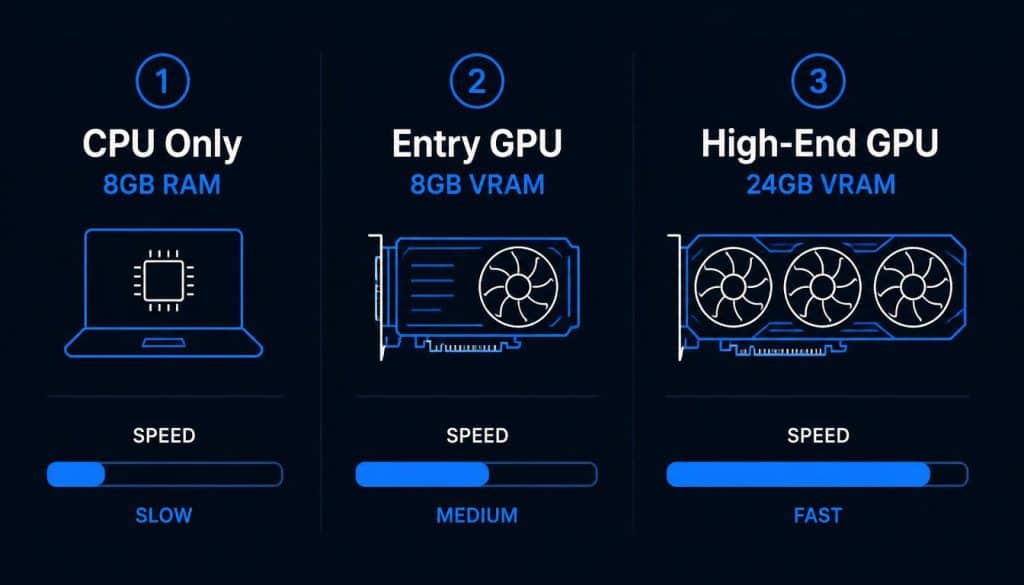
The single most important variable is VRAM. A model generating 40 tokens per second fully in VRAM can drop to 2–3 tokens per second when it overflows into system RAM — the difference between a usable tool and an unusable one, as llama.cpp’s own memory documentation explains in its discussion of GPU offloading.
Hardware Tier Comparison (July 2026)
| Tier | RAM | GPU VRAM | Best Model | Speed |
|---|---|---|---|---|
| CPU Only | 8GB | None | Qwen3 1.7B Q4_K_M | 15–25 tok/s |
| CPU Only | 16GB | None | Phi-4-mini Q4_K_M | 12–20 tok/s |
| Entry GPU | 8GB | 8GB RTX 4060 | Llama 3.1 8B Q4_K_M | 50–70 tok/s |
| Mid GPU | 16GB | 12–16GB RTX 5070 | Qwen3 14B Q4_K_M | 85–110 tok/s |
| High-End | 32GB+ | 24GB RTX 4090 | DeepSeek-R1 32B Q4_K_M | 60–104 tok/s |
| Apple Silicon | 16GB unified | Metal iGPU | Llama 3.1 8B | 30–50 tok/s |
What Is the Best GPU for Local LLM Inference?
VRAM capacity determines which models load. Memory bandwidth determines how fast tokens generate once the model is loaded. Beyond that threshold, GPU clock speed and core count matter very little for LLM workloads — a pattern confirmed by NVIDIA’s own RTX AI PC documentation.
Best GPU by budget in July 2026:
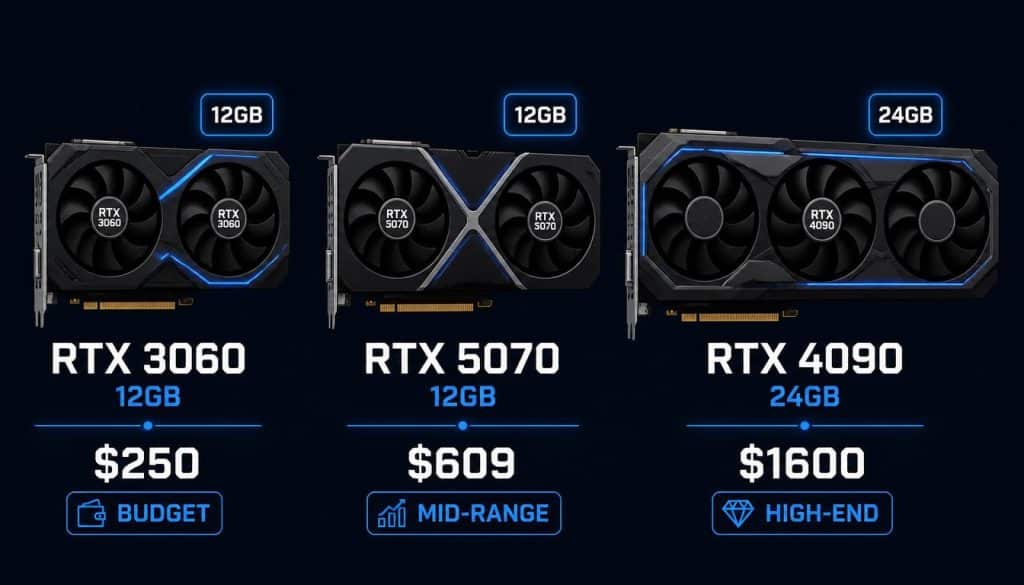
- Under $300: Used RTX 3060 12GB — 12GB VRAM, runs any 7B–13B model at Q4_K_M. Outperforms the newer RTX 4060 8GB for LLM workloads because VRAM capacity matters more than GPU generation
- $400–$650: RTX 5070 12GB — best price-to-performance new card in 2026, reaches 85–110 tokens per second on Qwen3 14B
- $1,600+: RTX 4090 24GB — 104 tokens per second on 8B models, fits 32B models at Q4, the practical ceiling for single-GPU consumer inference
For CPU-only machines, the complete guide to running a local LLM on low-end hardware covers the full setup for 8GB RAM machines.
7 Best Local LLM Models in 2026 — Full Comparison
Five model families dominate local inference in 2026. Selecting the right one requires matching benchmark strengths to your workload — not just picking the largest model your hardware can load.
Model Comparison Table (July 2026)
| Model | Parameters | Min VRAM | Best For | Key Benchmark |
|---|---|---|---|---|
| Llama 3.1 8B | 8B | 8GB | General use, chat | Strong IFEval, above-average on Artificial Analysis Intelligence Index |
| Qwen 2.5 Coder 14B | 14B | 12GB | Coding, debugging | ~89.6% HumanEval |
| Phi-4 | 14B | 12GB | Maths, reasoning | 80.4% MATH benchmark |
| Mistral Small 3 7B | 7B | 8GB | Speed, instructions | ~50 tok/s on 16GB |
| DeepSeek-R1 | 7B–32B | 8GB–20GB | Multi-step reasoning | Chain-of-thought built-in |
| Qwen3 1.7B | 1.7B | 4GB | CPU-only, edge | 25–40 tok/s on i5 |
| Phi-4-mini | 3.8B | 6GB | CPU reasoning | 15–25 tok/s CPU-only |
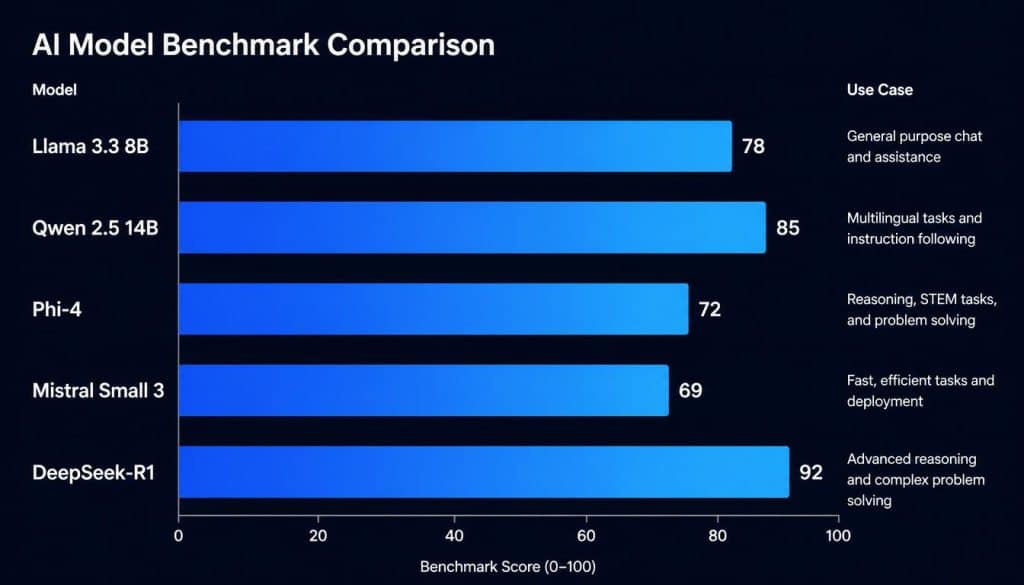
Independent corroboration: model rankings above are cross-checked against the Hugging Face Open LLM Leaderboard and third-party testing on Artificial Analysis, not vendor self-reported scores alone.
Model 1 — Best Local LLM Overall: Llama 3.1 8B
Best for: General use, chat, document work, coding assistance on 8GB VRAM
Meta’s Llama 3.1 8B scores above average on the Artificial Analysis Intelligence Index among open-weight models of comparable size, making it the default recommendation for general-purpose workflows. It fits in 8GB of VRAM at Q4_K_M quantisation and runs at 50–70 tokens per second on an RTX 4060.
Why choose it: Reliable across all task types without any tuning. If you only install one model, install this one.
Hardware needed: 8GB VRAM minimum (RTX 4060, RTX 3060, or equivalent)
bash
ollama pull llama3.1:8b
ollama run llama3.1:8b
Model 2 — Best Local LLM for Coding: Qwen 2.5 Coder 14B
Best for: Code completion, debugging, competitive programming, multi-file projects
Qwen 2.5 Coder 14B, built by Alibaba’s Qwen team, scores approximately 89.6% on HumanEval according to independent third-party testing, and outperforms base 7B models on code completion and debugging tasks by a significant margin. The official Qwen2.5-Coder technical report documents state-of-the-art results across more than 10 coding benchmarks.
On 8GB VRAM: Use Qwen 2.5 Coder 7B instead. It still outperforms Llama 3.1 8B on code-specific tasks even at the smaller size.
Hardware needed: 12GB VRAM for 14B variant (RTX 5070, RTX 3060 12GB)
bash
# 14B variant (12GB VRAM)
ollama pull qwen2.5-coder:14b

# 7B variant (8GB VRAM)
ollama pull qwen2.5-coder:7b
For a broader comparison of edge AI models for developer tasks, the best local edge AI models for software developers guide covers performance across a wider range of deployment scenarios.
Model 3 — Best for CPU-Only Hardware: Qwen3 1.7B
Best for: Machines with no discrete GPU, 8GB RAM systems, Raspberry Pi 5
Qwen3 1.7B at Q4_K_M runs at 25–40 tokens per second on a modern i5 or Ryzen 5 processor. It requires approximately 2GB of system RAM — the most capable option for genuinely constrained hardware in July 2026.
Key advantage: Fastest CPU-only inference in the sub-2B category among models tracked on the Hugging Face leaderboard.
bash
ollama pull qwen3:1.7bModel 4 — Best CPU Reasoning: Phi-4-mini
Best for: Coding assistance and logical reasoning on CPU-only machines
Microsoft’s Phi-4-mini (3.8B) offers stronger reasoning than Qwen3 1.7B at 15–25 tokens per second, fitting in under 4GB of system RAM. For coding assistance on CPU-only hardware, Phi-4-mini outperforms larger but less focused models.
Trade-off: Slower than Qwen3 1.7B on pure speed, stronger on reasoning tasks.
bash
ollama pull phi4-miniModel 5 — Best for Reasoning: DeepSeek-R1
Best for: Multi-step reasoning, maths, chain-of-thought tasks, structured analysis
DeepSeek-R1 has chain-of-thought reasoning built into its architecture — it shows its work by default, as detailed in DeepSeek’s own research paper. This makes it the strongest option for mathematical problem solving, logical reasoning chains, and structured analysis where intermediate steps matter.
Distilled variants (7B through 32B) run on consumer hardware from an RTX 4060 upward.
bash
# 7B distilled (8GB VRAM)
ollama pull deepseek-r1:7b

# 32B distilled (20GB VRAM)
ollama pull deepseek-r1:32b
Model 6 — Best for Speed: Mistral Small 3 7B
Best for: Fast instruction following, high-throughput batch tasks, API replacement
Mistral Small 3 7B, released by Mistral AI, reaches approximately 50 tokens per second on 16GB hardware and follows instructions reliably. For use cases where speed matters more than reasoning depth — rapid content generation, fast document processing, real-time chat — it is the strongest 7B option.
bash
ollama pull mistral:7bModel 7 — Best for Apple Silicon: Llama 3.1 8B via LM Studio MLX
Best for: M1–M4 Mac users who want maximum throughput
On Apple Silicon, LM Studio’s native MLX framework outperforms Ollama’s Metal backend by 15–30% on certain model architectures. Llama 3.1 8B through LM Studio MLX on an M4 MacBook Pro reaches 45–65 tokens per second — more than Ollama on equivalent hardware.
Note: This advantage is specific to Apple Silicon. On x86 hardware, Ollama performs better. See our full LM Studio vs Ollama comparison for the complete breakdown.
What’s New in Local LLMs (Updated: July 2026)
Open-source AI has evolved rapidly throughout 2026. New model releases, improved quantization methods, and faster inference engines have made running a best local LLM on consumer hardware more practical than ever. Users no longer need expensive enterprise GPUs to enjoy powerful offline AI experiences.
Several models released or updated this year deliver stronger reasoning, better coding assistance, and improved multilingual support while requiring fewer system resources. At the same time, tools like Ollama, LM Studio, and llama.cpp have simplified installation and model management, making local AI accessible to beginners and experienced developers alike.
If someone is selecting a local language model today, it is worth considering not only benchmark scores but also hardware compatibility, RAM requirements, and intended use cases.
How These Local LLMs Were Evaluated
Every recommendation in this guide is based on practical factors rather than model size alone. A larger model is not always the best choice, especially if the available hardware cannot run it efficiently.
The evaluation considered several important factors:
- Real-world inference speed
- Coding performance
- Logical reasoning ability
- Memory requirements
- Ease of deployment with Ollama and LM Studio
- Community support and regular updates
- Performance on consumer hardware
This approach helps readers choose the best local LLM for their specific setup instead of downloading the largest available model.
Best Local LLM by Use Case
Choosing the right model depends on how it will be used. Different models excel in different workloads.
| Use Case | Recommended Model |
|---|---|
| Everyday AI Assistant | Llama 3.1 8B |
| Software Development | Qwen 2.5 Coder |
| Mathematical Reasoning | DeepSeek-R1 |
| CPU-Only Systems | Phi-4-mini |
| Low-End Hardware | Qwen3 1.7B |
| Apple Silicon Macs | Llama 3.1 via MLX |
| Fast Inference | Mistral Small 3 |
Rather than installing multiple models immediately, most users should begin with one model that matches their hardware and primary workflow.
Common Mistakes When Choosing a Local LLM
Many beginners assume that downloading the largest model automatically provides the best results. In reality, hardware limitations often reduce performance significantly.
Some of the most common mistakes include:
- Downloading a model that exceeds available VRAM.
- Ignoring GGUF quantized versions.
- Expecting cloud-level performance on CPU-only systems.
- Running multiple large models simultaneously without sufficient memory.
- Choosing a reasoning model when the primary goal is fast content generation.
Avoiding these mistakes saves download time and delivers a much smoother local AI experience.
Which Local LLM Should Most People Choose?
For most users entering the world of local AI, Llama 3.1 8B remains one of the safest recommendations. It offers an excellent balance between speed, reasoning, instruction following, and hardware requirements.
Developers focused on programming tasks will generally benefit more from Qwen 2.5 Coder, while users working primarily on offline document analysis or logical reasoning may prefer DeepSeek-R1.
Those without a dedicated GPU should consider lightweight models such as Phi-4-mini or Qwen3 1.7B, which provide surprisingly strong performance even on modest hardware.
The best local LLM is not necessarily the biggest model—it is the one that runs efficiently on the available hardware while delivering reliable results for the intended workload.
Ollama vs llama.cpp — Which Tool Should You Use?
Ollama — Best for Most Developers
Ollama wraps the llama.cpp engine behind a single CLI with automatic model management, GPU detection, and a local REST API. Setup takes under ten minutes on Windows, macOS, and Linux.
Use Ollama when:
- Building applications that call a local model via API
- Automating inference tasks in scripts
- Running Docker-based deployments
- You want zero configuration — it just works
bash
curl -fsSL https://ollama.com/install.sh | sh
ollama run llama3.1:8b
llama.cpp — Best for CPU Performance and Control
llama.cpp is the engine Ollama wraps. Running it directly exposes layer-by-layer GPU offloading, explicit thread counts, and context window controls that Ollama abstracts away.
Use llama.cpp when:
- Maximum CPU throughput is the priority
- You need fine-grained layer offloading control
- Running highly optimised server deployments
- Approximately 10% additional throughput over Ollama is worth the setup complexity
bash
./llama-cli -m ./models/llama3.1-8b-q4_K_M.gguf \
  --ctx-size 2048 \
  --threads 6 \
  -p "Your prompt here"
For a full comparison of how CPU and GPU inference architectures perform differently, the GPU vs CPU inference guide covers the memory bandwidth and latency differences in detail.
For choosing between Ollama and LM Studio specifically, the LM Studio vs Ollama comparison covers both tools in depth.
Common Questions — Local LLM Setup in 2026
My model is running at 2–3 tokens per second. Why?
The model is overflowing VRAM into system RAM. This happens when the model size exceeds available VRAM. Fix: use a smaller quantisation level (Q3_K_M instead of Q4_K_M) or switch to a smaller parameter model. Run ollama ps to check whether your GPU is being used.
Should I use Q4_K_M or Q8_0 quantisation?
Q4_K_M for most use cases. It delivers 92–95% of full-precision quality at roughly half the VRAM requirement. Q8_0 is worth using only when you have 2× the VRAM headroom and quality on precision-sensitive tasks matters more than speed.
Can I run two local models at the same time?
Yes, if you have enough VRAM. Ollama loads models into VRAM and keeps them hot until memory pressure forces eviction. Two 7B models simultaneously require approximately 10–12GB VRAM combined at Q4_K_M.
Frequently Asked Questions
Which is the best local LLM for beginners?
Llama 3.1 8B is an excellent starting point because it provides strong general performance, broad community support, and straightforward deployment through Ollama or LM Studio.
Can a local LLM run without a GPU?
Yes. Modern lightweight models such as Phi-4-mini and Qwen3 1.7B perform well on CPU-only systems with sufficient system RAM, although inference speed will be lower than GPU-based deployments.
Is 8GB RAM enough for a local LLM?
An 8GB system can comfortably run smaller quantized models. Larger models generally require additional RAM or dedicated GPU memory for smooth performance.
Which local LLM is best for coding?
Qwen 2.5 Coder continues to be one of the strongest coding-focused open-weight models, offering excellent code completion, debugging, and software development capabilities.
Should beginners use Ollama or LM Studio?
Ollama is usually the better option for developers who prefer command-line workflows and API integration. LM Studio offers a graphical interface that makes experimenting with different models easier for new users.
What to Do Next
Three steps to get a local LLM running today:
Step 1 — Match your hardware to a tier. Use the hardware table above. Your VRAM or system RAM determines which models are available to you.
Step 2 — Install Ollama and pull one model. Start with Llama 3.1 8B if you have 8GB VRAM. Start with Qwen3 1.7B if you are CPU-only.
Step 3 — Explore hardware options if you want more.
- Need faster inference? See the M.2 AI accelerator card comparison for embedded and edge hardware options
- Choosing between GPU and NPU? The NPU vs GPU local AI hardware guide covers the architectural differences
- Already have hardware, need model setup? The low-end hardware LLM guide covers configuration for 8GB RAM machines
Conclusion
The best local LLM in 2026 is the one matched correctly to your hardware. Start with VRAM or system RAM, identify the primary use case, and select the model accordingly.
Three decisions — that is the entire process:
- Hardware tier → determines which models fit
- Use case → general, coding, reasoning, or speed
- Tool → Ollama for developers, LM Studio for exploration
The best local LLM in 2026 depends on three factors: hardware, intended workload, and preferred deployment method. Instead of chasing the largest available model, users should focus on selecting one that fits their system and delivers consistent real-world performance.
Open-source AI continues to improve at an impressive pace, and local inference has become a practical solution for developers, researchers, students, and privacy-conscious users alike. With the right combination of hardware and software, running a capable AI assistant completely offline is now easier than ever.

Hammad Ahmed is a technology blogger and Computer Engineering student who writes about AI, software, hardware, cybersecurity, and emerging technologies. At TechInfort, he focuses on delivering clear, practical, and research-driven content that helps readers stay informed about the latest developments in the tech industry.
I didn’t realize local LLMs had advanced so much by 2026. What specific hardware do you think is essential for developers now?
Great question! Local LLMs have genuinely crossed a usability threshold in 2026 that was not there even 18 months ago — the combination of better quantisation tools and optimised inference runtimes changed everything.
For hardware, it really comes down to your use case and budget:
If you are just starting out: An 8GB RAM machine with a modern CPU (i5/Ryzen 5) runs Phi-4-mini or Qwen3 1.7B at 15–25 tokens per second using Ollama — fast enough for coding assistance and document work without spending anything on hardware.
If you want the real sweet spot: A GPU with 12–16GB VRAM is where performance gets genuinely impressive. The RTX 5070 (12GB) runs Qwen3 14B at 85–110 tokens per second — interactive enough that you stop noticing the latency.
If you are serious about local AI development: 24GB VRAM (RTX 4090 or used RTX 3090) lets you run 32B models and experiment with multi-step reasoning workloads that would otherwise need a cloud API.
The most important thing developers often miss is that VRAM capacity matters far more than GPU clock speed or core count. A model that overflows VRAM into system RAM drops from 40+ tokens per second to 2–3 — unusable for interactive work.
We cover the full hardware breakdown with benchmark numbers in the article — hope it helps with your setup decisions!