An NPU (Neural Processing Unit) is a dedicated AI chip built into modern laptops for on-device inference. In 2026, top NPU laptops include Apple M4 (38 TOPS), AMD Ryzen AI 300 (50 TOPS), and Intel Core Ultra 200V (48 TOPS). For local LLM work, Apple Silicon delivers the best practical performance due to unified memory architecture — not raw TOPS rating.
Every new laptop spec sheet in 2026 lists a TOPS number you probably did not see three years ago. It comes from a dedicated chip called the NPU — Neural Processing Unit — and it is now standard hardware in flagship laptops from Apple, AMD, Intel, and Qualcomm. Microsoft requires a minimum of 40 TOPS for Copilot+ PC certification. Laptop manufacturers have responded by integrating increasingly capable NPU silicon into consumer hardware.
The problem is that TOPS ratings are frequently misunderstood — and sometimes actively misleading. An NPU laptop rated at 50 TOPS can perform slower on a real local LLM workload than one rated at 38 TOPS, depending entirely on memory bandwidth and software stack maturity. Understanding what an NPU actually does, how it differs from a CPU and GPU, and when it genuinely improves performance is the practical knowledge that laptop buyers and developers need before making a purchase decision.
This guide covers all of it: NPU architecture, how TOPS ratings work, which applications actually use the NPU today, the best NPU laptops in 2026, and whether an NPU helps with local AI inference.
Key Takeaways
- An NPU (Neural Processing Unit) is a dedicated on-device AI chip built for low-precision matrix operations — the maths that powers neural network inference
- TOPS (Tera Operations Per Second) measures raw throughput but does not predict real-world AI performance — memory bandwidth is equally decisive
- Apple M4 (38 TOPS) frequently outperforms AMD Ryzen AI 300 (50 TOPS) on local LLM workloads because of its unified memory architecture and higher bandwidth
- NPU laptops use 4–10× less power than GPUs for the same AI inference tasks — the primary practical advantage for mobile developers
- Most useful NPU applications in 2026: background removal, live captions, noise suppression, on-device transcription, and small LLMs (1B–3B parameters)
- Microsoft’s 40 TOPS Copilot+ threshold is a software certification gate, not a hardware performance boundary
What Is an NPU? The Technical Explanation
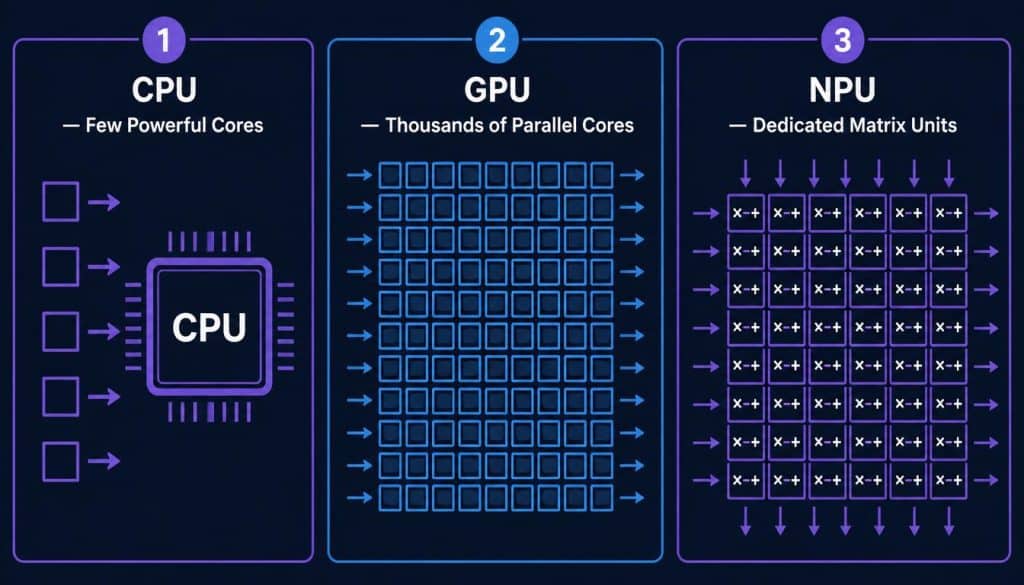
A Neural Processing Unit is a fixed-function hardware accelerator designed specifically for the matrix multiplication and accumulation operations that dominate neural network inference. It is not a general-purpose processor and cannot replace a CPU or GPU — it is a specialist chip that handles one category of workload with exceptional efficiency.
The core architectural unit inside every NPU is the Multiply-Accumulate (MAC) unit. As IBM’s NPU vs GPU analysis explains, NPUs group thousands of MAC units together to process large matrices simultaneously. Neural network inference reduces almost entirely to repeated matrix multiplication — an operation that MAC units execute in parallel at extremely low power draw compared to the floating-point units inside a CPU or the shader cores inside a GPU.
How NPU Architecture Differs from CPU and GPU
A CPU contains a small number of powerful, general-purpose cores optimised for sequential logic — running an operating system, managing memory, handling file operations, and branching through complex conditional instructions. It is the control centre of a computing system and executes a wide variety of instruction types efficiently.
A GPU contains thousands of smaller parallel cores, originally designed for rendering pixels simultaneously. Those same cores proved useful for AI training and inference because neural network operations are inherently parallel. GPUs remain the dominant hardware for training large models and for inference on large models that require high VRAM capacity.
An NPU sheds the features that CPUs and GPUs carry for general-purpose workloads. It strips the architecture down to the operations that matter for neural networks: low-precision integer arithmetic (INT4, INT8), large-scale parallel matrix processing, and high-speed on-chip memory for model weight access. The result is a chip that performs specific AI tasks faster and at significantly lower power than either alternative.
What Does TOPS Mean and Why Does It Mislead?
TOPS stands for Tera Operations Per Second — one trillion operations per second. It measures how many low-precision integer operations the NPU can execute in one second under ideal conditions.
The critical limitation of TOPS as a comparison metric is that it only measures compute throughput. For many AI workloads — particularly large language model inference — the bottleneck is not compute but memory bandwidth. As SolidAITech’s 2026 NPU guide explains: an NPU rated at 50 TOPS with 50 GB/s memory bandwidth will be slower on a 7B-parameter model than a 30 TOPS NPU with 100 GB/s of bandwidth. Additional compute capacity sits idle when the memory bus cannot deliver model weights fast enough.
This architectural reality explains a result that surprises many laptop buyers: Apple’s M4 Neural Engine, rated at 38 TOPS, consistently outperforms the AMD Ryzen AI 300 series (50 TOPS) on local LLM inference via Core ML. The M4’s unified memory architecture gives the Neural Engine, CPU, and GPU equal, high-bandwidth access to the same physical memory pool. That bandwidth advantage offsets the TOPS deficit on memory-bound workloads.
NPU Laptop Comparison — 2026 Consumer Silicon
By mid-2026, every major laptop silicon platform integrates a capable NPU. The differentiation is now software ecosystem maturity and memory bandwidth rather than raw TOPS ratings.
| Platform | NPU Name | TOPS | Memory Architecture | LLM Performance |
|---|---|---|---|---|
| Apple M4 | Neural Engine | 38 TOPS | Unified memory (high BW) | ✅ Excellent |
| Apple M4 Pro/Max | Neural Engine | 38 TOPS | Unified memory (very high BW) | ✅ Best in class |
| AMD Ryzen AI 300 | XDNA 2 | 50 TOPS | Separate LPDDR5X | ✅ Good |
| Intel Core Ultra 200V | AI Boost | 48 TOPS | Separate LPDDR5X | ✅ Good |
| Qualcomm Snapdragon X2 | Hexagon NPU | 45 TOPS | Separate LPDDR5X | ✅ Good |
| Samsung Exynos 2500 | MX Core NPU | ~35 TOPS | Integrated | ✅ Moderate |
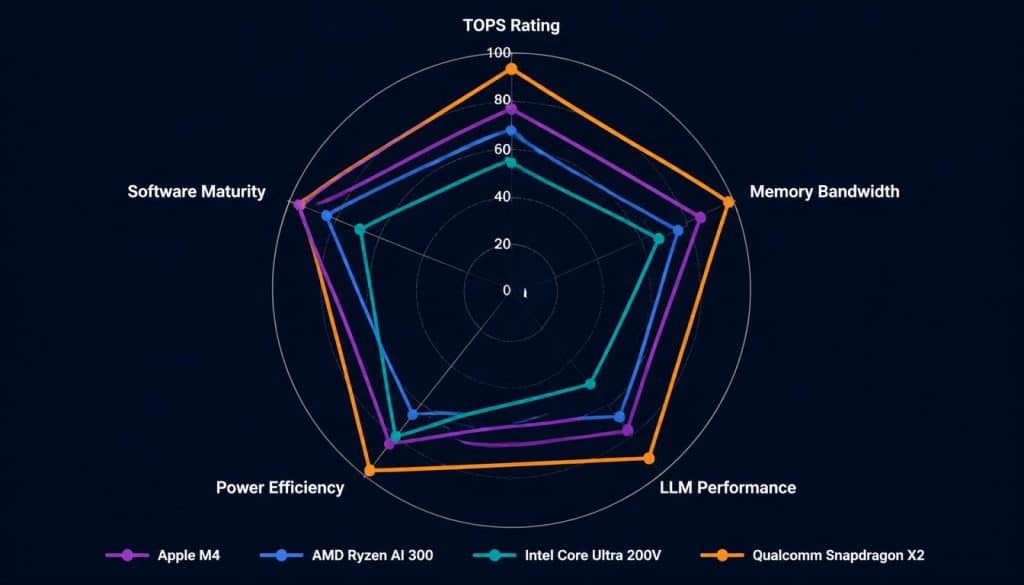
For developers choosing an NPU laptop for local AI inference work, the Apple M-series remains the most practical option in 2026 — not because of TOPS rating but because Core ML and MLX are the most mature frameworks for on-device model execution, and the unified memory architecture maximises throughput on memory-bound LLM workloads.
For Windows-based developers, the AMD Ryzen AI 300 and Intel Core Ultra 200V platforms both support ONNX Runtime with DirectML, which provides NPU acceleration across a growing range of applications. Framework maturity on Windows NPU is improving but remains behind Apple’s ecosystem. For a detailed comparison of how NPU and GPU architectures handle local AI inference differently, the NPU vs GPU local AI hardware guide covers the underlying tradeoffs in depth.
What Applications Actually Use the NPU in 2026?
This is the question that matters most for buyers. The NPU’s value depends entirely on whether the software you use routes workloads to it.
Always Running on NPU (Mature Support)
The following workloads run on the NPU reliably across Apple, AMD, Intel, and Qualcomm platforms in 2026:
- Background blur and removal on video calls (Microsoft Teams, Zoom, FaceTime)
- Live captions and transcription — Windows Live Captions, Apple dictation, Pixel Recorder
- Noise suppression — Microsoft Studio Effects, Apple FaceTime mic modes
- Biometric authentication — Face ID on Apple, Windows Hello with Enhanced Sign-in Security
- Photo indexing and semantic search — Apple Photos, Windows AI search
- Real-time camera effects — Eye contact correction, portrait lighting
These workloads run continuously in the background at extremely low power draw — typically 2–5W — compared to 15–40W if the same tasks were handled by the GPU.
Increasingly Running on NPU (2025–2026)
- On-device small LLMs — Phi-3.5 Mini, Gemma 2 2B, Llama 3.2 1B–3B running through Apple Intelligence, Microsoft Copilot, or local Ollama-compatible servers
- Image generation — Stable Diffusion variants optimised for Apple Neural Engine or AMD XDNA
- Code completion — GitHub Copilot’s on-device suggestion engine on supported platforms
- Translation — Windows Live Captions language translation, offline translation apps
What Apps Use NPU That Developers Care About?
For software developers specifically, the most relevant NPU-accelerated workflows in 2026 are on-device model inference via Core ML (Apple) or ONNX Runtime with DirectML (Windows), and AI-assisted coding through tools that route suggestions to on-device models rather than cloud APIs. The privacy advantage is meaningful for developers working on proprietary codebases — queries never leave the machine.
Can the Galaxy S25 Ultra NPU Run Local LLMs?
The Galaxy S25 Ultra uses the Qualcomm Snapdragon 8 Elite with a Hexagon NPU delivering approximately 45 TOPS. Samsung’s Galaxy AI suite runs multiple on-device models through this NPU, including live translation, writing assistance, and generative editing features in the camera application.
For local LLM inference specifically, the Snapdragon 8 Elite NPU supports models in the 1B–7B parameter range through Qualcomm’s AI Stack. Community benchmarks on local LLM inference confirm the S25 Ultra handles Llama 3.2 3B at usable throughput for interactive use — roughly 20–35 tokens per second depending on quantisation level and context window size.
The constraint on smartphones is memory capacity rather than NPU throughput. The Snapdragon 8 Elite can access 12GB of LPDDR5X, of which approximately 8–9GB is available for application use. This limits practical model size to 3B–7B parameters at 4-bit quantisation. For developers building mobile AI applications or evaluating on-device inference pipelines, the S25 Ultra’s NPU is a capable test platform within those memory constraints.
The broader pattern — NPU acceleration reaching mobile hardware at this performance level — is directly relevant to edge AI deployment decisions. For a broader view of how edge AI models perform on constrained hardware across different form factors, the best local edge AI models for software developers guide covers deployment benchmarks in detail.
Does an NPU Help With Local LLM Inference on a Laptop?
The honest answer in 2026: it depends on the platform, the model size, and the software stack.
For Apple Silicon laptops, the Neural Engine provides meaningful acceleration for models up to approximately 7B parameters through Core ML and MLX. The unified memory architecture ensures the Neural Engine, CPU, and GPU all share the same high-bandwidth memory pool, which removes the bottleneck that limits NPU performance on discrete-memory platforms.
For Windows NPU laptops, ONNX Runtime with DirectML provides the path to NPU acceleration, but model support remains narrower than Core ML. Ollama on Windows routes inference to the GPU or CPU — not the NPU — in most configurations as of mid-2026. Developers wanting NPU-accelerated local LLM inference on Windows currently need to work directly with the platform’s native AI SDK (AMD Ryzen AI SDK, Intel OpenVINO, or Qualcomm AI Stack) rather than through standard inference tools.
The practical implication: if local LLM inference is the primary workload, a laptop with a discrete GPU (even an entry-level RTX 4060 Laptop GPU with 8GB VRAM) will outperform any NPU laptop on raw token throughput. The NPU’s advantage is power efficiency and always-on capability — running continuously at 2–5W rather than spinning up a 40W GPU for each inference request.
For developers who want to understand the full hardware stack from M.2 AI accelerator modules to discrete GPUs, the M.2 AI accelerator card comparison and the complete local LLM hardware guide cover the performance tradeoffs across every hardware tier.
NPU Driver and Software Stack — What Developers Need to Know
The NPU is only useful when software actively routes workloads to it. On all platforms, this requires a functional NPU driver and a compatible AI framework.
NPU Driver Installation
On Windows, NPU drivers are included in standard chipset driver packages for AMD Ryzen AI 300, Intel Core Ultra 200V, and Qualcomm Snapdragon X platforms. If the NPU is not appearing in Device Manager under the “Neural Processors” category, updating the chipset driver package from the laptop manufacturer’s support page (not Windows Update) typically resolves the issue.
AMD Ryzen AI 300 users can verify NPU functionality using the AMD NPU Check utility. Intel Core Ultra users can use Intel Arc Control or the OpenVINO Model Server to confirm the AI Boost NPU is active. Qualcomm Snapdragon X users on Windows can check Qualcomm AI Stack documentation for device validation steps.
On Apple Silicon Macs, no separate NPU driver installation is required — the Neural Engine is managed entirely by macOS through Core ML, and all compatible applications access it automatically.
Developer APIs by Platform
| Platform | NPU | Developer API | Framework Support |
|---|---|---|---|
| Apple Silicon | Neural Engine | Core ML, MLX | PyTorch (via MLX), TensorFlow Lite |
| AMD Ryzen AI | XDNA 2 NPU | Ryzen AI SDK, ONNX Runtime | ONNX, PyTorch, TensorFlow |
| Intel Core Ultra | AI Boost | OpenVINO, ONNX Runtime | ONNX, PyTorch, TensorFlow |
| Qualcomm Snapdragon | Hexagon NPU | Qualcomm AI Stack, QNN | ONNX, TensorFlow Lite, PyTorch |
ONNX (Open Neural Network Exchange) is the cross-platform standard that allows a model trained in PyTorch or TensorFlow to run on any compatible NPU with minimal conversion effort. As the Wikipedia NPU entry notes, the Khronos Group is actively working on standardising AI-related interfaces across platforms — a process that will simplify multi-platform NPU development significantly over the next two years.
Frequently Asked Questions:
What is an NPU in a laptop and do I need one?
An NPU (Neural Processing Unit) is a dedicated chip for AI inference tasks — background removal, live captions, on-device translation, and small language models. Every flagship laptop in 2026 includes one. Whether you need one depends on your workload: if you use AI-assisted tools regularly, an NPU reduces battery drain compared to routing the same tasks through the GPU. For local LLM inference specifically, a discrete GPU still outperforms any current laptop NPU on raw throughput.
What does the NPU TOPS rating actually mean?
TOPS (Tera Operations Per Second) measures how many low-precision integer operations the NPU can perform per second. It is a useful indicator of compute capacity but does not predict real-world performance on its own — memory bandwidth is equally important. An NPU with fewer TOPS but higher memory bandwidth can outperform a higher-TOPS chip on language model inference
What apps use the NPU on Windows laptops?
On Windows Copilot+ PCs in 2026, apps that use the NPU include Microsoft Teams (background effects), Windows Live Captions (transcription and translation), Windows Studio Effects (noise suppression, eye contact), Windows Search (AI-powered semantic search), and Paint (Cocreator generative AI). Third-party apps using ONNX Runtime with DirectML can also route workloads to the NPU when developers explicitly target it.
Can an NPU laptop run local LLMs without a GPU?
Yes, with limitations. Apple Silicon laptops run local LLMs effectively through Core ML and MLX, using the Neural Engine alongside CPU and GPU via unified memory. On Windows NPU laptops, standard inference tools like Ollama currently use the CPU or discrete GPU rather than the NPU for most configurations. Model support is limited to 1B–7B parameters on consumer NPU hardware. For larger models, a discrete GPU remains necessary.
Is the 40 TOPS Copilot+ PC requirement a meaningful performance threshold?
It is a software certification gate rather than a hardware performance boundary. Microsoft chose 40 TOPS to align with the first generation of Snapdragon X Elite, Intel Lunar Lake, and AMD Strix Point silicon at launch. Below this threshold, certain Copilot+ features including Recall, Live Captions translation, and Studio Effects refuse to run — not because the hardware cannot perform the task, but because Microsoft set a software eligibility floor. As SolidAITech’s analysis notes, the value of an NPU laptop compounds over 18–24 months as applications route more workloads to the silicon already present.
Conclusion
An NPU laptop in 2026 is no longer a premium differentiator — it is standard hardware in any machine above entry-level pricing. The practical value for developers lies in always-on AI features running at low power draw: live transcription, background effects, and on-device language features that would otherwise consume significant GPU or CPU resources continuously.
For local LLM inference workloads, Apple Silicon remains the strongest NPU laptop platform because of its unified memory architecture and mature Core ML framework. Windows NPU platforms are capable and improving, but standard inference tools have not yet fully routed workloads to NPU hardware. A developer choosing an NPU laptop primarily for local AI inference should prioritise memory bandwidth and framework maturity over raw TOPS rating.
The NPU is infrastructure for a software ecosystem that is still being built. Buying the hardware now is the correct decision — the software capability will continue expanding into that hardware over the next two years.
For the full picture of local AI hardware options from laptop NPUs through discrete GPUs to M.2 accelerator modules, the GPU vs CPU inference guide covers performance benchmarks across every tier of consumer hardware available in 2026.

Hammad Ahmed is a technology blogger and Computer Engineering student who writes about AI, software, hardware, cybersecurity, and emerging technologies. At TechInfort, he focuses on delivering clear, practical, and research-driven content that helps readers stay informed about the latest developments in the tech industry.