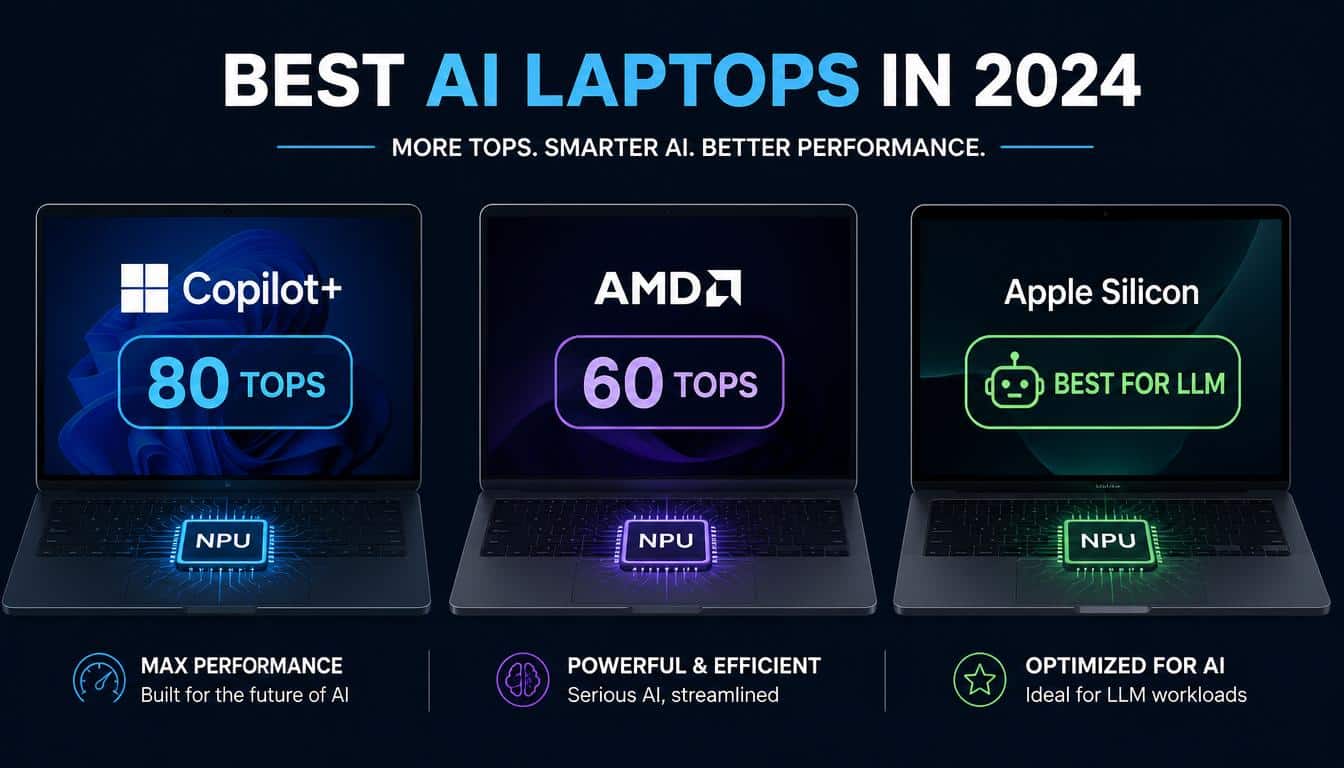
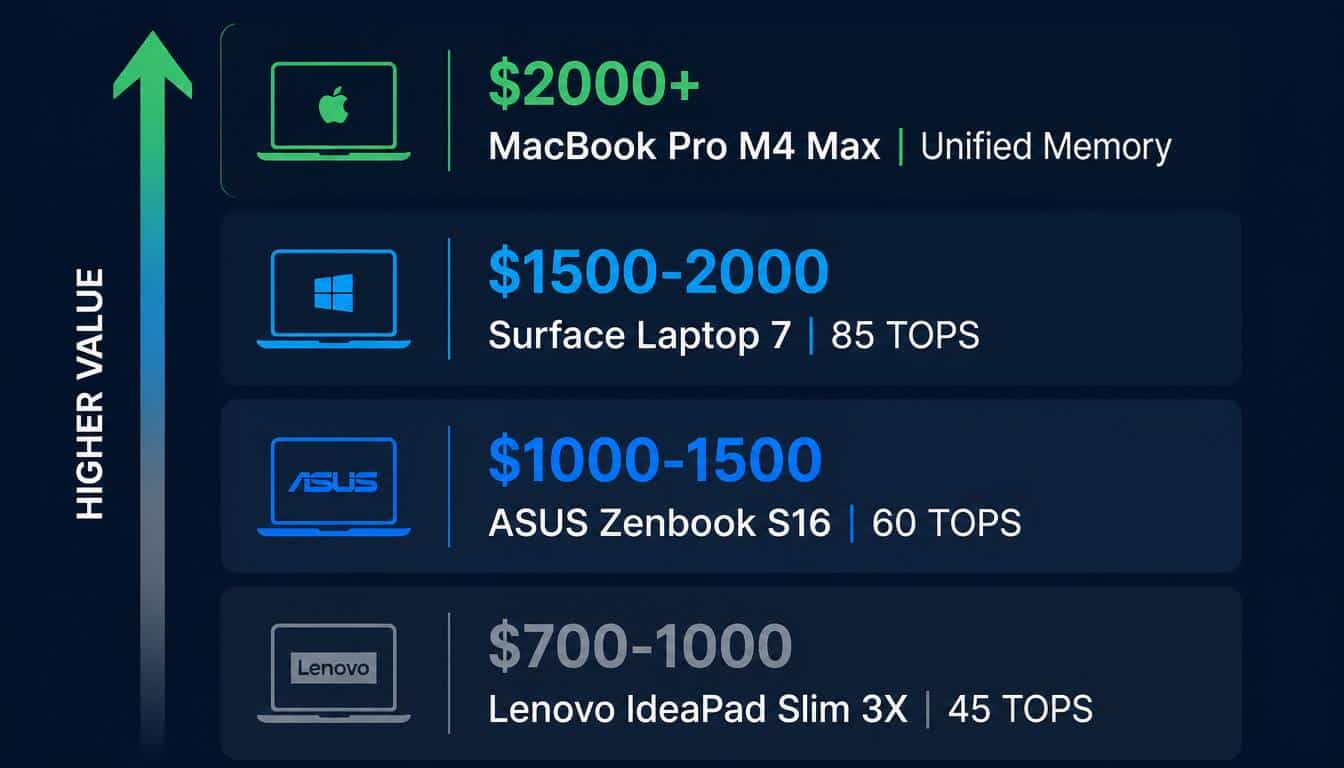
Best NPU laptop for developers in 2026 by budget: Under $1,000 — Lenovo IdeaPad Slim 3X (Snapdragon X). $1,000–$1,500 — ASUS Zenbook S16 (AMD Ryzen AI 300). $1,500–$2,000 — Microsoft Surface Laptop 7 (Snapdragon X2 Elite). $2,000+ — Apple MacBook Pro M4 Max. For local LLM inference with Ollama: Apple Silicon wins by a significant margin. For Windows AI features and Copilot+ certification: any laptop clearing 40 TOPS works.
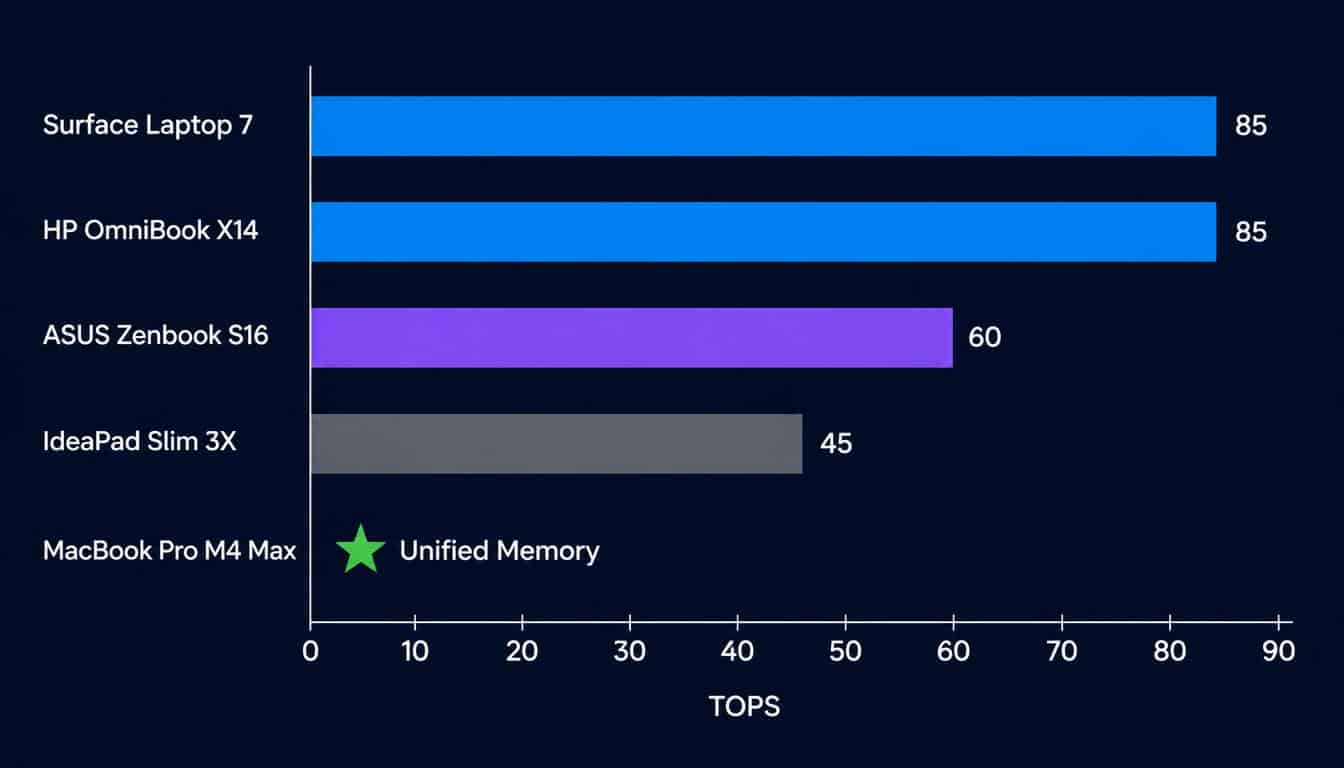
Every major laptop manufacturer shipped an NPU in 2026 — but not every NPU is worth buying for the same reasons. The 40 TOPS threshold that Microsoft set for Copilot+ PC certification, which unlocked Windows AI features including Recall, Live Captions, and Cocreator, is now the floor rather than the ceiling. <cite index=”12-1″>Snapdragon X2 Elite Extreme leads at 80–85 TOPS, the current consumer ceiling</cite>, while AMD Ryzen AI 400 reaches 60 TOPS with full x86 compatibility. Apple’s M5 Neural Engine cannot be measured in TOPS the same way as Windows silicon, but outperforms every Windows NPU laptop on local LLM inference benchmarks.
The buying decision for developers in 2026 is not which laptop has the most TOPS. It is which laptop matches the actual workload: Windows AI features and Copilot+ certification, on-device local LLM inference with tools like Ollama, battery-efficient background AI tasks, or software development with AI-assisted coding. Each use case points to a different recommendation.
Key Takeaways
- 40 TOPS is the Copilot+ PC minimum — every 2026 flagship chip clears this comfortably
- Snapdragon X2 Elite leads Windows NPU performance at 80–85 TOPS; AMD Ryzen AI 400 follows at 60 TOPS
- TOPS ratings are not standardised — INT4 versus INT8 measurement can inflate numbers significantly
- Apple M5 Neural Engine is architecturally different from Windows NPUs and wins on local LLM inference
- Ollama and llama.cpp route inference to the GPU or CPU on Windows — not the NPU — for most model sizes
- Battery life improvements of up to 40% come from routing background AI tasks through the NPU instead of the CPU
What Makes an NPU Laptop Worth Buying in 2026?
What Is the 40 TOPS Copilot+ Requirement?
Microsoft defines a Copilot+ PC as a laptop delivering a minimum of 40 TOPS (tera operations per second) of dedicated NPU performance, paired with at least 16GB of RAM and 256GB of storage. <cite index=”9-1″>Microsoft defines a Copilot+ PC as delivering 40+ TOPS, which has become the de facto baseline for 2026. Anything below that threshold handles basic noise cancellation and background blur. Anything above 40 TOPS runs serious on-device AI.</cite>
The Copilot+ certification unlocks a specific set of Windows AI features that run locally on the NPU rather than requiring a cloud connection: Windows Recall (screen content indexing and semantic search), Live Captions with real-time translation, Cocreator in Paint, Windows Studio Effects (background blur, eye contact correction, noise suppression), and enhanced Windows Hello biometric authentication. For developers who use these features regularly, any Copilot+ laptop provides them — the meaningful performance difference between a 40 TOPS chip and an 80 TOPS chip on these specific tasks is smaller than the marketing suggests.
Why TOPS Ratings Are Often Misleading
TOPS figures are not standardised across manufacturers, which makes direct comparisons unreliable without additional context. <cite index=”12-1″>TOPS figures aren’t standardized across manufacturers — they can be measured at different math precisions (INT8 versus INT4) or include sparse computation that inflates theoretical peak performance well above sustained real-world throughput.</cite>
A chip rated at 80 TOPS using INT4 sparse computation may deliver less real-world AI throughput than a chip rated at 50 TOPS using INT8 dense computation, depending on the task. When comparing laptops, look for whether the TOPS figure represents the NPU alone or a combined platform figure that includes CPU and GPU contributions — combined figures inflate the number without reflecting dedicated NPU capability. For a detailed explanation of how NPU architecture affects AI inference performance beyond the raw TOPS number, the guide to NPU architecture in laptops covers the underlying hardware in detail.
What NPU Tasks Actually Improve Developer Productivity in 2026?
The NPU earns its place in a developer workflow through always-on, background AI tasks that would otherwise consume CPU or GPU resources continuously. <cite index=”8-1″>Battery life improvements of 40% compared to traditional laptops while running background AI tasks like live captions and webcam enhancement</cite> come directly from offloading these workloads to the dedicated NPU.
Verified NPU-accelerated developer tasks in July 2026 include: background noise suppression during video calls (critical for remote teams), live transcription of meetings and technical sessions, AI-powered semantic search through local files via Windows Recall, and on-device code completion through tools like GitHub Copilot’s local inference mode on Copilot+ hardware. For a complete breakdown of which applications currently route workloads to the NPU, the developer guide to using NPU for AI tasks covers verified applications with Task Manager confirmation steps.
Best NPU Laptops 2026 — Full Comparison
| Laptop | Chip | NPU TOPS | RAM | Starting Price | Best For |
|---|---|---|---|---|---|
| Apple MacBook Pro M4 Max | Apple M4 Max | N/A (unified) | 36–128GB | $2,499 | Local LLM, macOS dev |
| Microsoft Surface Laptop 7 | Snapdragon X2 Elite | 80–85 TOPS | 16–64GB | $1,499 | Windows AI, battery |
| HP OmniBook X 14 | Snapdragon X2 Elite | 80–85 TOPS | 16–32GB | $1,299 | Battery life, portability |
| ASUS Zenbook S16 | AMD Ryzen AI 300 | 50 TOPS | 16–32GB | $1,099 | x86 dev, AMD ecosystem |
| Lenovo Yoga Slim 9i | Intel Core Ultra Series 2 | 47–48 TOPS | 16–32GB | $1,199 | Intel ecosystem, thin |
| Lenovo IdeaPad Slim 3X | Snapdragon X | 45 TOPS | 16GB | $699 | Budget Copilot+ entry |
| ASUS Zenbook A14 | Snapdragon X1-26-100 | 45 TOPS | 16GB | $799 | Lightweight, value |
| Samsung Galaxy Book5 Pro | Intel Core Ultra Series 2 | 47 TOPS | 16–32GB | $1,299 | OLED display, thin |
Best Overall NPU Laptop for Most Developers — Microsoft Surface Laptop 7
The Microsoft Surface Laptop 7 earns the top Windows recommendation for most developers through its combination of Snapdragon X2 Elite performance (80–85 TOPS), <cite index=”8-1″>20-hour battery life and premium build quality with full Copilot+ PC capabilities</cite>, and the tightest hardware-software integration of any Windows laptop in 2026. Microsoft’s direct control over both the hardware and the Windows AI feature roadmap means Copilot+ features typically arrive on the Surface first and work most reliably there.
The Surface Laptop 7 comes in 13.8-inch and 15-inch configurations, starting at $1,499 for 16GB RAM and 512GB storage. The Snapdragon X2 Elite architecture means all x86 Windows applications run through ARM emulation — software compatibility is excellent for web development, Python, and JavaScript tooling, but some legacy x86-only tools may have issues. For a pure Windows AI development machine where Copilot+ features and battery life are the primary requirements, it is the clearest recommendation.
Best for Battery Life — HP OmniBook X 14
<cite index=”9-1″>HP claims up to 27.5 hours of battery life. In real video playback test with brightness at 50%, 25 hours and 12 minutes was measured.</cite> The HP OmniBook X 14 delivers the longest real-world battery life of any developer laptop tested in 2026, powered by the same Snapdragon X2 Elite chip as the Surface Laptop 7 at a lower price point ($1,299 starting). For developers who work frequently in locations without reliable power access — travel, co-working spaces, client sites — the OmniBook X 14’s endurance advantage is the deciding factor.
Performance is comparable to the Surface Laptop 7 on AI tasks. The trade-off is build quality and display — the Surface offers a superior premium feel at the cost of $200. If battery life is the primary requirement and budget matters, the OmniBook X 14 is the rational choice.
Best AMD NPU Laptop — ASUS Zenbook S16 (Ryzen AI 300)
<cite index=”7-1″>The ASUS Zenbook S16 achieves Copilot+ certification at this performance level, enabling productivity AI assistants, code completion in development environments, and image upscaling for presentation graphics.</cite> The Ryzen AI 300 inside the Zenbook S16 delivers 50 TOPS of dedicated NPU performance alongside AMD’s RDNA integrated graphics — a combination that provides meaningfully better GPU performance than Snapdragon alternatives for tasks that do benefit from integrated graphics: video processing, image editing, and light local inference on 3B–7B parameter models.
The critical advantage for developers committed to the x86 ecosystem is full native compatibility with all Windows software. No ARM emulation layer means legacy tools, enterprise software, and Docker Desktop with Linux containers all run at native speed. Starting at $1,099, the Zenbook S16 is the strongest AMD recommendation in 2026 for developers who prioritise software compatibility and AMD’s driver ecosystem.
Best Budget NPU Laptop — Lenovo IdeaPad Slim 3X
At $699, the Lenovo IdeaPad Slim 3X delivers Copilot+ PC certification through the Snapdragon X processor at 45 TOPS — clearing the 40 TOPS threshold that unlocks all Windows AI features. <cite index=”8-1″>Budget shoppers should choose the Lenovo IdeaPad Slim 3X, which delivers identical Copilot+ certification capabilities</cite> to more expensive alternatives for the AI feature set that most users actually need day to day.
The compromise at this price point is RAM — 16GB is the standard configuration, which limits the model size available for local LLM inference. For developers who primarily want Windows AI features (Live Captions, Studio Effects, Recall) without paying a premium, the IdeaPad Slim 3X represents the most cost-effective path to a verified Copilot+ PC in 2026.
Best for Local LLM Inference — Apple MacBook Pro M4 Max
Apple Silicon’s unified memory architecture gives the MacBook Pro M4 Max a structural advantage on local LLM inference that no Windows NPU laptop can currently match. The M4 Max with 36GB of unified memory runs Llama 3.3 8B at 30–50 tokens per second through Ollama with Metal GPU acceleration — a performance level that requires a discrete NVIDIA GPU on Windows to replicate.
<cite index=”10-1″>The best overall laptop in 2026 is the Apple MacBook Pro M4 Max for creators and developers who need silent, sustained performance and 18+ hours</cite> of battery life. For developers who split time between inference work and software development on macOS, it is the only laptop that handles both workloads at full performance without thermal throttling or noise. For Mac-specific Ollama setup including Metal GPU verification and model recommendations by memory tier, the Ollama Mac setup guide covers the full configuration process.
NPU Laptops for Local LLM Inference — The Honest Picture
This is the section most buying guides omit. <cite index=”14-1″>For actually running local LLMs in 2026, a discrete RTX GPU beats a Copilot+ PC’s NPU — and it is not close. Copilot+ NPUs are real AI accelerators, but most local LLM tools (Ollama, llama.cpp) still run on the GPU or CPU, not the NPU.</cite>
Which Developer Tools Use the NPU for Local LLM Work?
As of July 2026, Ollama routes inference to the integrated GPU or CPU on Windows laptops — not the NPU — for most configurations. llama.cpp with DirectML can route workloads to the NPU through ONNX Runtime on supported hardware, but model compatibility is narrower than GPU or CPU inference and requires explicit configuration. Foundry Local, Microsoft’s developer-focused local inference runtime, is the most accessible path to NPU-accelerated LLM inference on Copilot+ hardware and supports Phi-4-mini and Qwen 2.5 on certified devices.
The practical consequence is that a developer buying a Windows NPU laptop specifically for Ollama-based local LLM inference will not see performance meaningfully different from a laptop without an NPU — the inference engine does not currently route to the NPU in standard configurations. For that use case, Apple Silicon or a discrete GPU remains the more effective hardware choice.
What Local LLM Performance Can You Expect on NPU Laptops?
| Chip | LLM Tool | 3B Model Speed | 7B Model Speed | Notes |
|---|---|---|---|---|
| Snapdragon X2 Elite | Foundry Local | 20–30 tok/s | 10–15 tok/s | NPU-accelerated via Foundry Local |
| AMD Ryzen AI 300 | llama.cpp + DirectML | 15–20 tok/s | 8–12 tok/s | Requires manual DirectML config |
| Intel Core Ultra 200V | Ollama (CPU) | 10–15 tok/s | 5–8 tok/s | CPU inference, no NPU routing |
| Apple M4 Max (36GB) | Ollama (Metal) | 45–65 tok/s | 35–50 tok/s | Unified memory, GPU+CPU inference |
For a detailed comparison of how NPU and GPU hardware differ architecturally for AI inference workloads, the NPU vs GPU local AI hardware guide covers the memory bandwidth and workload distribution differences in depth. For choosing between Ollama and other inference tools on Windows, the LLM hardware and model guide for 2026 covers hardware requirements per model size.
Which NPU Chip Is Best in 2026?
Qualcomm Snapdragon X2 Elite — Current Windows NPU Leader
<cite index=”11-1″>Qualcomm Snapdragon X2 Elite — ARM-based champion for battery life. Top-end hits 80 TOPS. Trade-off: software compatibility.</cite> The Snapdragon X2 Elite Extreme variant reaches 80–85 TOPS in the highest-tier configurations, representing a 78% year-over-year improvement in NPU performance from the first-generation Snapdragon X Elite. Battery life on Snapdragon-powered laptops consistently leads the Windows category — 20+ hours of real-world use is achievable on productivity workloads.
The trade-off remains software compatibility. All x86 Windows applications run through ARM emulation on Snapdragon hardware. For most modern development tools — Visual Studio Code, JetBrains IDEs, Git, Python, Node.js, Docker Desktop — emulation is transparent and performance impact is minimal. Legacy x86-only enterprise software, certain virtualisation tools, and some niche development utilities may encounter compatibility issues.
AMD Ryzen AI 400 — x86 Powerhouse at 60 TOPS
<cite index=”11-1″>AMD Ryzen AI 400 (Gorgon Point) — x86 powerhouse. Ryzen AI 9 HX 475 delivers 60 TOPS, 12% better multi-core than previous generation, full Windows compatibility.</cite> For developers who cannot accept any software compatibility risk, AMD Ryzen AI 400 is the strongest Windows NPU option. Full native x86 execution means every Windows application runs without emulation overhead. Combined with AMD’s RDNA integrated graphics — which outperform Snapdragon’s integrated GPU for graphics-intensive development tasks — the Ryzen AI 400 is the more practical choice for developers with diverse software requirements.
Intel Core Ultra Series 3 (Panther Lake) — Balanced x86 Option
<cite index=”11-1″>Intel Core Ultra Series 3 (Panther Lake) — Balanced option. 48–50 TOPS, competitive battery life, safe x86 buy.</cite> Intel’s Panther Lake represents the mainstream x86 entry point for 2026 AI laptops, shipping on Intel’s 18A process node from late January 2026. The 48–50 TOPS NPU clears the Copilot+ threshold and supports the full Windows AI feature set. Battery life is competitive with AMD alternatives though not at Snapdragon’s level. For developers already in the Intel ecosystem with Intel-optimised tooling or workloads that benefit from Intel’s oneAPI framework, Panther Lake is the logical choice.
Apple M5 Neural Engine — A Different Architecture Entirely
Apple’s M5 Neural Engine operates differently from Windows NPUs in ways that make direct TOPS comparison misleading. The Neural Engine works alongside the CPU and GPU through unified memory — all three share the same physical memory pool at the same bandwidth. This eliminates the memory capacity constraint that limits discrete VRAM on Windows laptops and the bandwidth bottleneck that limits Windows NPU inference on large models.
<cite index=”11-1″>Apple M5 Neural Engine — Not measured in TOPS the same way, but AI GPU performance tripled over M4. Best for macOS users.</cite> For developers on macOS who need local LLM inference as a primary workload, the M5’s architecture advantage on large models (32B–70B parameters at full quality) is not available on any Windows NPU laptop at any price point.
Budget Guide — Best NPU Laptop at Every Price Point
Under $1,000 — Entry Copilot+ PC
At this tier, the Lenovo IdeaPad Slim 3X ($699, Snapdragon X) and the ASUS Zenbook A14 ($799, Snapdragon X1-26-100) both deliver full Copilot+ PC certification with 45 TOPS NPU performance. Both include 16GB of RAM, which is the minimum for comfortable developer workflows. The choice between them comes down to display preference and brand ecosystem — the Zenbook A14 is notably lighter at 980g.
$1,000–$1,500 — Sweet Spot for Most Developers
The ASUS Zenbook S16 (AMD Ryzen AI 300, from $1,099) and HP OmniBook X 14 (Snapdragon X2 Elite, from $1,299) represent the best value for developer use cases in 2026. The Zenbook S16 is the choice for x86 software compatibility and AMD GPU performance. The OmniBook X 14 is the choice for maximum battery life and highest NPU TOPS at the lowest price for Snapdragon X2.
$1,500–$2,000 — Premium NPU Laptops
The Microsoft Surface Laptop 7 (from $1,499) and Samsung Galaxy Book5 Pro (from $1,299 — 16-inch OLED) compete at this tier. The Surface wins on build quality and Windows AI integration. The Galaxy Book5 Pro wins on display quality with its 3K OLED panel — relevant for developers who also work with visual content.
$2,000+ — Apple Silicon and Workstation Class
The Apple MacBook Pro M4 Pro (from $1,999 with 24GB unified memory) is the entry point for Apple Silicon at this tier. Step up to the M4 Max configuration ($2,499 with 36GB) for local LLM inference on 14B–32B models at full quality. There is no Windows NPU laptop at any price that matches M4 Max inference performance on models above 14B parameters.
Frequently Asked Questions
Do I need an NPU laptop as a developer in 2026?
For most developers, an NPU laptop is worth choosing when buying new hardware in 2026 — not because of current NPU capabilities, but because the feature roadmap makes it forward-compatible. Windows 12 is expected to require 40 TOPS minimum for full AI feature access. Buying NPU-equipped hardware now ensures compatibility with AI developer tools as they mature over the next two to three years. If local LLM inference is the primary use case today, Apple Silicon or a discrete GPU remains more capable than any Windows NPU laptop.
Can I run Ollama on an NPU laptop?
Yes — Ollama installs and runs on all NPU laptops. On Windows, Ollama routes inference to the integrated GPU or CPU rather than the NPU in standard configuration. Performance depends on the integrated GPU quality and system RAM: expect 10–20 tok/s on 7B models on AMD Ryzen AI 300 hardware and 15–25 tok/s on Snapdragon X2 Elite. On Apple Silicon Macs, Ollama uses Metal GPU through unified memory and delivers 35–55 tok/s on 8B models.
What is the difference between a Copilot+ PC and a regular laptop?
A Copilot+ PC meets Microsoft’s minimum specification of 40 TOPS NPU performance, 16GB RAM, and 256GB storage. This certification unlocks Windows AI features that are not available on standard laptops: Windows Recall, Live Captions with real-time translation, Cocreator in Paint, enhanced Studio Effects, and future Windows 12 AI capabilities. Standard laptops below the 40 TOPS threshold handle basic noise suppression and background blur through the CPU or GPU but cannot run the full Copilot+ feature set.
Is Apple Silicon better than Windows NPU laptops for AI development?
For local LLM inference specifically, yes — Apple Silicon’s unified memory architecture gives it a structural advantage on models above 14B parameters that no Windows NPU laptop currently matches. For Windows AI features, Copilot+ PC features, and software development requiring Windows-only tools, Windows NPU laptops are the appropriate choice. The platforms are complementary rather than directly competitive — the use case determines which is better.
What TOPS rating do I actually need for local AI work?
For Windows AI features (Recall, Live Captions, Studio Effects): 40 TOPS is sufficient — any Copilot+ PC covers this. For on-device LLM inference via Foundry Local on 1B–3B models: 45–50 TOPS is adequate. For 7B models via NPU-accelerated inference: 80+ TOPS (Snapdragon X2 Elite) provides better throughput. For 14B+ models: no Windows NPU laptop handles this efficiently — Apple Silicon or a discrete GPU is required.
What to Do Next
Buying an Apple Silicon Mac: The Ollama Mac setup guide covers Metal GPU verification, model selection by RAM tier (8GB to 128GB), and memory optimisation settings — everything needed from installation to first inference.
Buying a Windows NPU laptop: Start with the developer guide to using NPU for AI tasks to understand which tools and features actually use the NPU. Then verify your NPU is active through Task Manager and configure Foundry Local for local model inference on Copilot+ hardware.
Comparing NPU performance to discrete GPU options: The NPU vs GPU local AI hardware comparison covers the architectural differences that determine which hardware type serves each workload category — useful context before committing to a laptop-only setup versus adding a desktop GPU to your development environment.
Conclusion
The best NPU laptop for developers in 2026 depends on one question before all others: is the primary AI workload Windows AI features and Copilot+ productivity, or local LLM inference with tools like Ollama?
For Windows AI features and forward compatibility, any Copilot+ PC clearing 40 TOPS works. The Microsoft Surface Laptop 7 and HP OmniBook X 14 lead on battery life and NPU performance at reasonable prices. The ASUS Zenbook S16 leads for x86 software compatibility through AMD Ryzen AI 400.
For local LLM inference, Apple Silicon remains the only laptop platform that handles 14B–32B models efficiently. No Windows NPU laptop matches unified memory architecture for large model inference at this price tier.
Buy the hardware that matches your actual workload. The TOPS number on the spec sheet is the least reliable guide to making that decision.

Hammad Ahmed is a technology blogger and Computer Engineering student who writes about AI, software, hardware, cybersecurity, and emerging technologies. At TechInfort, he focuses on delivering clear, practical, and research-driven content that helps readers stay informed about the latest developments in the tech industry.