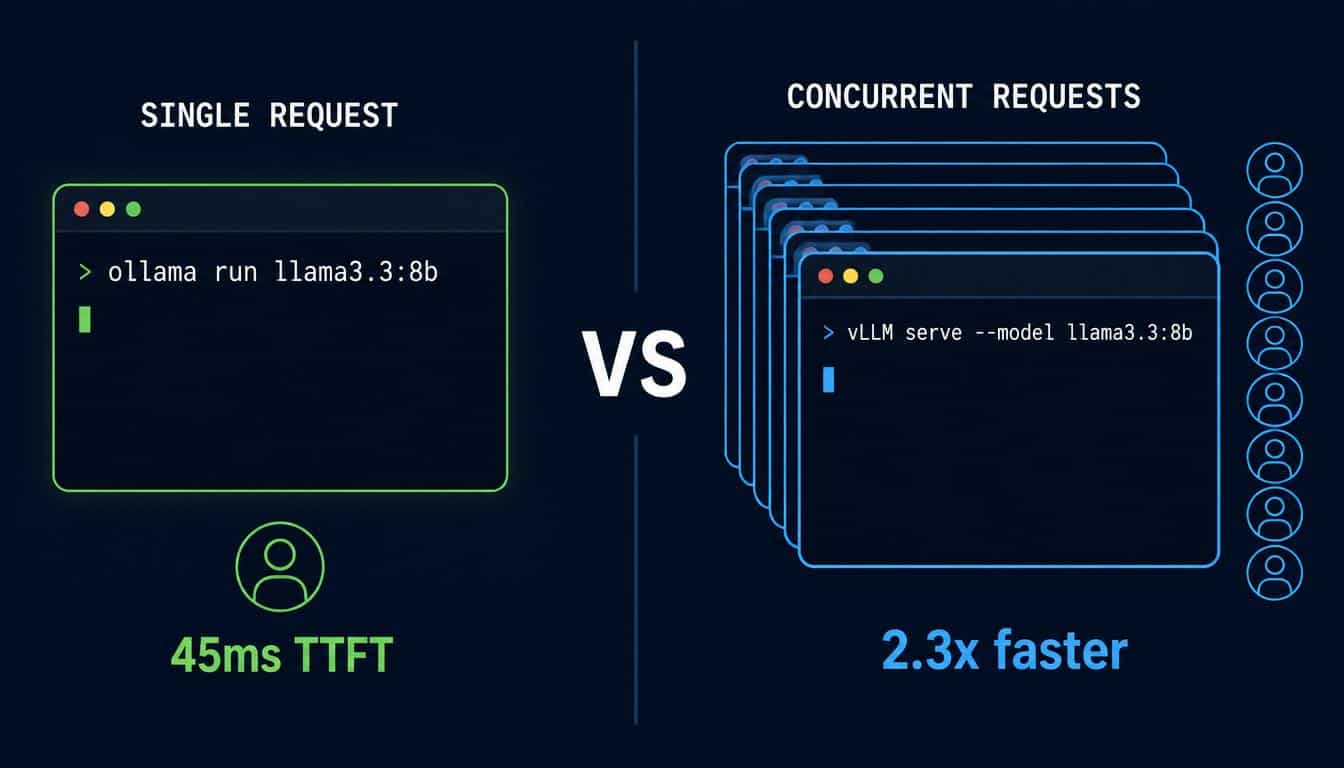
Quick Answer: vLLM is faster than Ollama only above 4–8 concurrent requests. At 1 user, Ollama delivers lower latency (45ms vs 82ms time-to-first-token). At 128 concurrent requests, vLLM achieves 3.23× higher throughput and Ollama begins breaking down. Choose Ollama for local development. Choose vLLM for production APIs serving 5 or more simultaneous users.
The headline appearing across AI developer forums in 2026 is consistent: vLLM is 16 times faster than Ollama. It is technically accurate. It is also practically misleading for the majority of developers who will read it.
The 16× figure originates from NVIDIA Blackwell H100 benchmarks measuring 128 concurrent requests on Llama 3.1 70B with NVFP4 quantisation. At that scale, vLLM achieved 8,033 tokens per second against Ollama’s 484. Those are production datacentre numbers. Most developers running local inference are not operating an H100 serving 128 simultaneous users.
At one concurrent request — the workload most local developers actually run — Ollama responds faster. The gap between the two tools is not a performance story. It is a concurrency story. Understanding that single distinction determines whether you choose the right inference engine or spend an afternoon migrating unnecessarily.
This guide provides the benchmark data at 1, 8, and 128 concurrent users, the exact threshold where the architecture difference becomes decisive, and the practical migration path if your workload genuinely requires the switch.
Key Takeaways
- At 1 concurrent user, Ollama is faster: 45ms versus 82ms time-to-first-token
- At 8 concurrent users, vLLM achieves 2.3× higher throughput (187 tok/s vs 82 tok/s)
- At 128 concurrent users, vLLM is 3.23× faster and Ollama begins failing requests
- The concurrency threshold where vLLM becomes necessary sits at approximately 4–8 sustained concurrent requests
- On Apple Silicon and Windows, Ollama remains the only production-ready option in July 2026
- Migration between the two tools takes one afternoon — both use OpenAI-compatible APIs
What Is the Real Difference Between vLLM and Ollama?
The tools occupy adjacent positions in the local LLM infrastructure stack but approach the problem from opposing architectural philosophies.
What Is Ollama and How Does It Work?
Ollama is a Go-based server that wraps the llama.cpp inference backend behind a single binary installer and a Docker-like model management interface. Installation on Linux requires one curl command. On Windows and macOS, a lightweight GUI installer handles setup in under two minutes. No Python environment, no dependency conflicts, no CUDA version management.
The model ecosystem centres on the GGUF format — pre-quantised model files that trade some precision for dramatically reduced memory requirements. A 7B parameter model that would require 14GB in full FP16 precision loads in approximately 4GB at Q4_K_M quantisation. Ollama pulls models from its curated library through a single command and begins serving an OpenAI-compatible REST API on port 11434 immediately after loading.
As of May 2026, Ollama crossed 172,000 GitHub stars, making it one of the most widely adopted open-source AI infrastructure projects in the developer ecosystem. Recent versions added cloud model offloading, web search API integration, streaming tool calls, and multimodal vision support — extending the platform well beyond its origins as a single-model local runner.
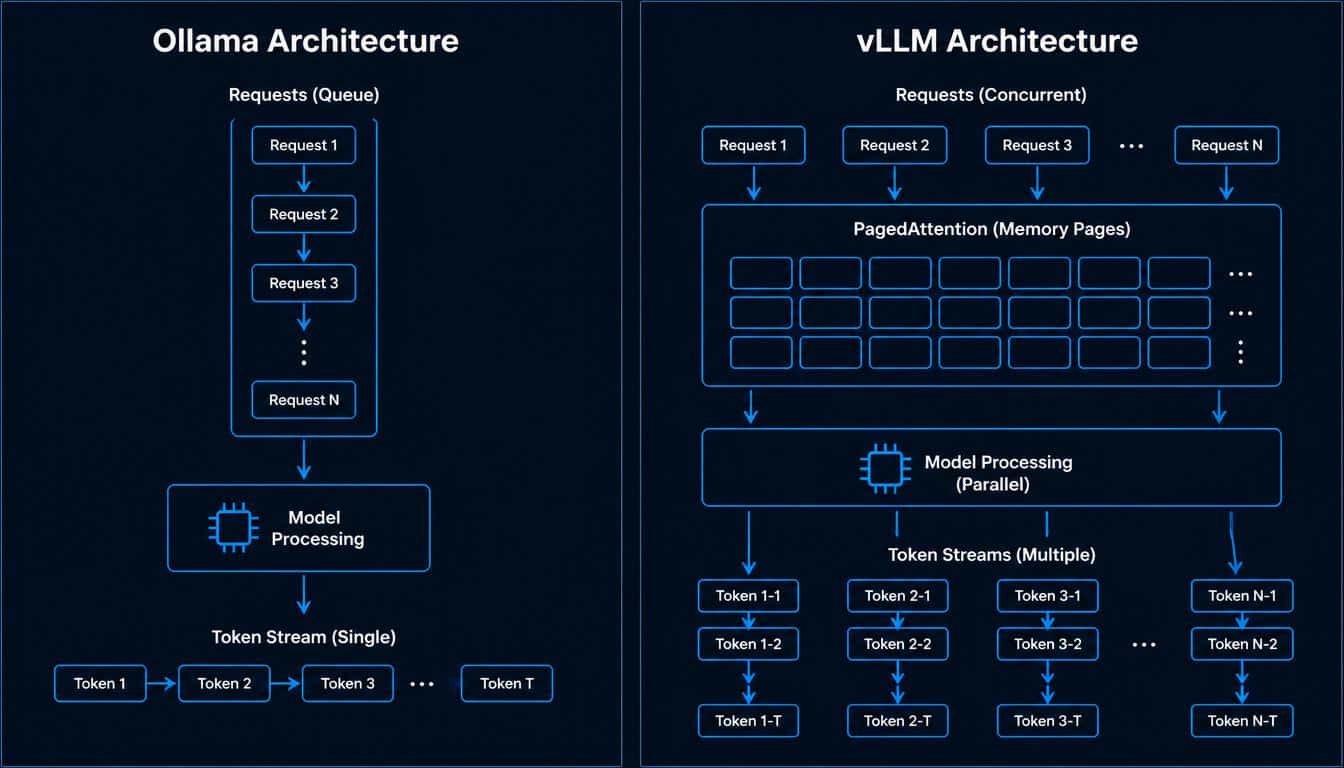
Ollama processes requests sequentially by default. Each generation runs to completion before the next request begins. The OLLAMA_NUM_PARALLEL environment variable allows limited concurrent handling, but the architecture does not include the dynamic memory scheduling that vLLM uses to saturate GPU capacity under load.
What Is vLLM and How Does It Work?
vLLM is a Python-based, GPU-first inference engine developed at UC Berkeley around the PagedAttention algorithm. PagedAttention borrows virtual memory concepts from operating systems — instead of reserving a large contiguous block of GPU memory for the KV cache of each request, it allocates small non-contiguous pages dynamically as tokens generate. This allows far more concurrent sequences to share GPU memory without fragmentation.
Combined with continuous batching — which slots new requests into ongoing generation passes at the token level rather than waiting for a full batch to complete — vLLM maintains near-linear throughput scaling as concurrent load increases. Where Ollama’s throughput plateaus around 22 requests per second once concurrency exceeds 32, vLLM continues scaling proportionally with GPU capacity.
The trade-off is setup complexity. vLLM requires a Python environment, pip installation, and familiarity with serving configuration parameters. First-time setup typically takes 30–60 minutes compared to Ollama’s 5 minutes. vLLM version 0.19.0 shipped in April 2026, and the project’s 2026 roadmap focuses on Engine Core improvements, distributed inference, and KV Cache Manager optimisations — doubling down on cluster-scale serving.
What Both Tools Share
Despite their architectural differences, Ollama and vLLM converge on several practical dimensions that make them genuinely interchangeable at the application layer. Both expose an OpenAI-compatible REST API, meaning any code written to call the OpenAI Python SDK works with either tool by changing one base URL. Both run the same models — Llama 3.3, Qwen3, DeepSeek-R1, Mistral, Gemma 3, and Phi-4 all run on either engine. Both are free, open-source, and Docker-compatible on Linux. The application code migration between them requires minimal modification in almost every case.
vLLM vs Ollama — Full Feature Comparison
| Feature | Ollama | vLLM |
|---|---|---|
| Install complexity | Single binary or installer | pip install + configuration |
| Setup time | 5 minutes | 30–60 minutes |
| Default model format | GGUF (quantised) | FP16 / FP8 / GGUF |
| API | OpenAI-compatible | OpenAI-compatible |
| API port | 11434 | 8000 |
| GPU memory management | Static allocation per model | PagedAttention (dynamic) |
| Concurrency model | Sequential + NUM_PARALLEL cap | Continuous batching |
| Single-user TTFT | 45ms ✅ | 82ms |
| 8 concurrent tok/s | 82 | 187 (2.3×) |
| 128 concurrent | Breaks at high load | 3.23× faster, stable |
| Apple Silicon | ✅ Native Metal | ⚠️ Experimental only |
| Windows support | ✅ | ❌ Linux only |
| Multi-GPU tensor parallelism | ❌ | ✅ via Ray backend |
| VRAM — Llama 3.3 8B | 16.5GB (FP16) | 17.2GB (FP16) |
| Docker | ✅ Official image | ✅ Official image |
| GitHub stars (May 2026) | 172,000+ | 40,000+ |
| Programming language | Go | Python |
Real Benchmark Data — vLLM vs Ollama at Every Concurrency Level
The benchmark numbers below draw from three independent sources: Red Hat’s engineering study using GuideLLM on an NVIDIA A100, Robert McDermott’s Medium benchmark comparing Qwen3-14B on dual consumer GPUs, and SitePoint’s controlled 2026 benchmark using identical hardware and models. All three arrive at the same qualitative shape.
Single User Performance — Ollama Wins on Latency
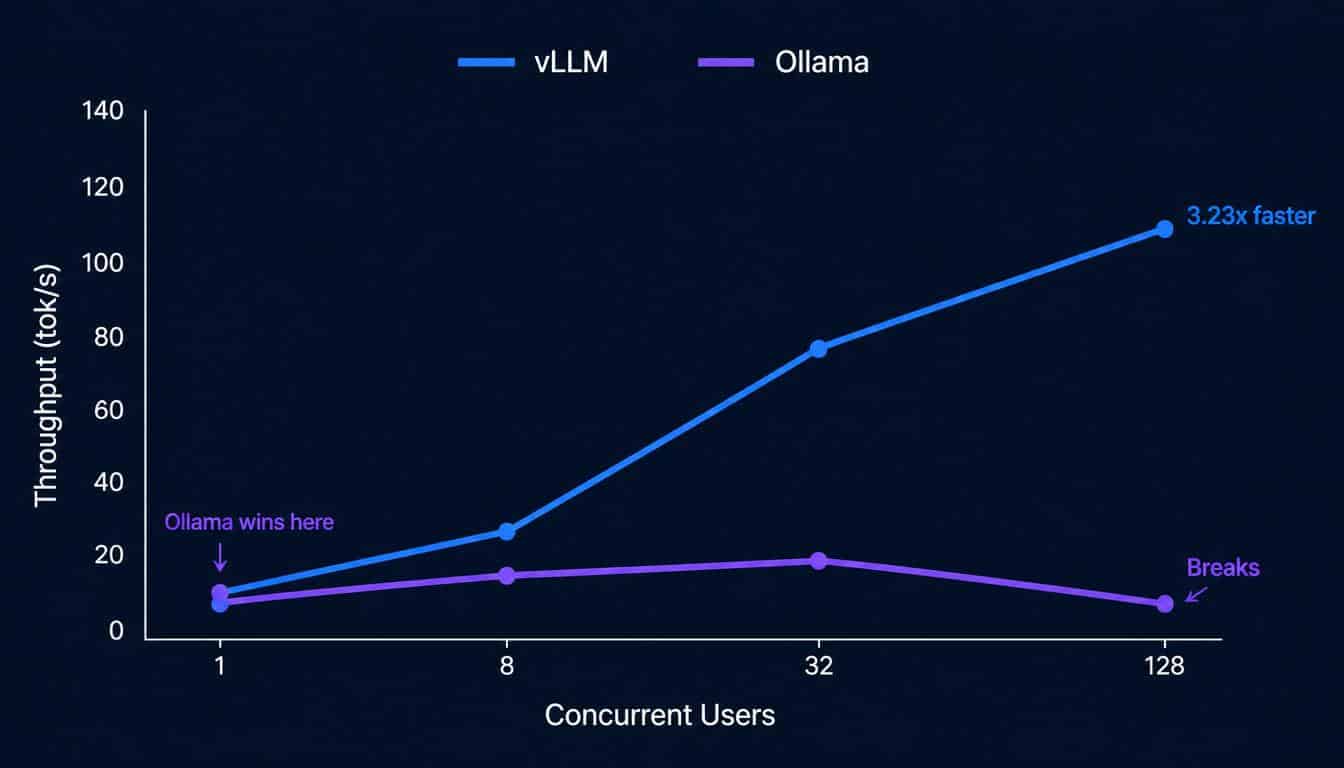
At one concurrent request, both tools produce near-identical throughput. The meaningful difference is time-to-first-token: Ollama delivers the first generated token in approximately 45 milliseconds, while vLLM takes approximately 82 milliseconds. For interactive chat applications where perceived responsiveness matters more than aggregate tokens per second, Ollama’s single-user experience is faster.
This result is counterintuitive given vLLM’s reputation, but it follows logically from the architecture. vLLM’s PagedAttention and continuous batching machinery add overhead that only pays off under concurrent load. At a batch size of one, both tools hit the same underlying matrix multiplication kernels — vLLM simply carries more scheduling infrastructure without the concurrency to justify it.
Eight Concurrent Users — vLLM Pulls Ahead
At 8 concurrent requests, the architectural gap becomes decisive. vLLM achieves approximately 187 tokens per second against Ollama’s 82 — a 2.3× advantage driven by continuous batching filling GPU capacity across all eight requests simultaneously. Ollama at this concurrency level is either queuing seven of the eight requests or running them in limited parallel mode, neither of which saturates the GPU efficiently.
The practical implication is clear: a small team of five to eight developers all querying the same local model simultaneously will experience noticeably better collective throughput on vLLM. Individual response latency remains similar, but the time from request submission to first token for queued requests grows substantially under Ollama’s sequential architecture.
128 Concurrent Users — Ollama Breaks Down
At 128 concurrent requests, the performance gap becomes a reliability gap. SitePoint’s 2026 benchmark found vLLM maintained a 100% success rate at 128 concurrent requests. Ollama produced errors and response times degrading from approximately 2 seconds to 45 seconds or more per request. McDermott’s independent benchmark recorded vLLM performing 3.23× faster than Ollama at this concurrency level, with Ollama’s throughput plateauing around 22 requests per second once concurrency exceeded 32.
The failure mode in Ollama at high concurrency is head-of-line blocking: a single stalled or long-running request delays the entire queue, causing other requests to wait regardless of their individual complexity. vLLM’s iteration-level scheduling processes tokens from multiple requests in the same forward pass, eliminating this bottleneck entirely.
The Concurrency Threshold
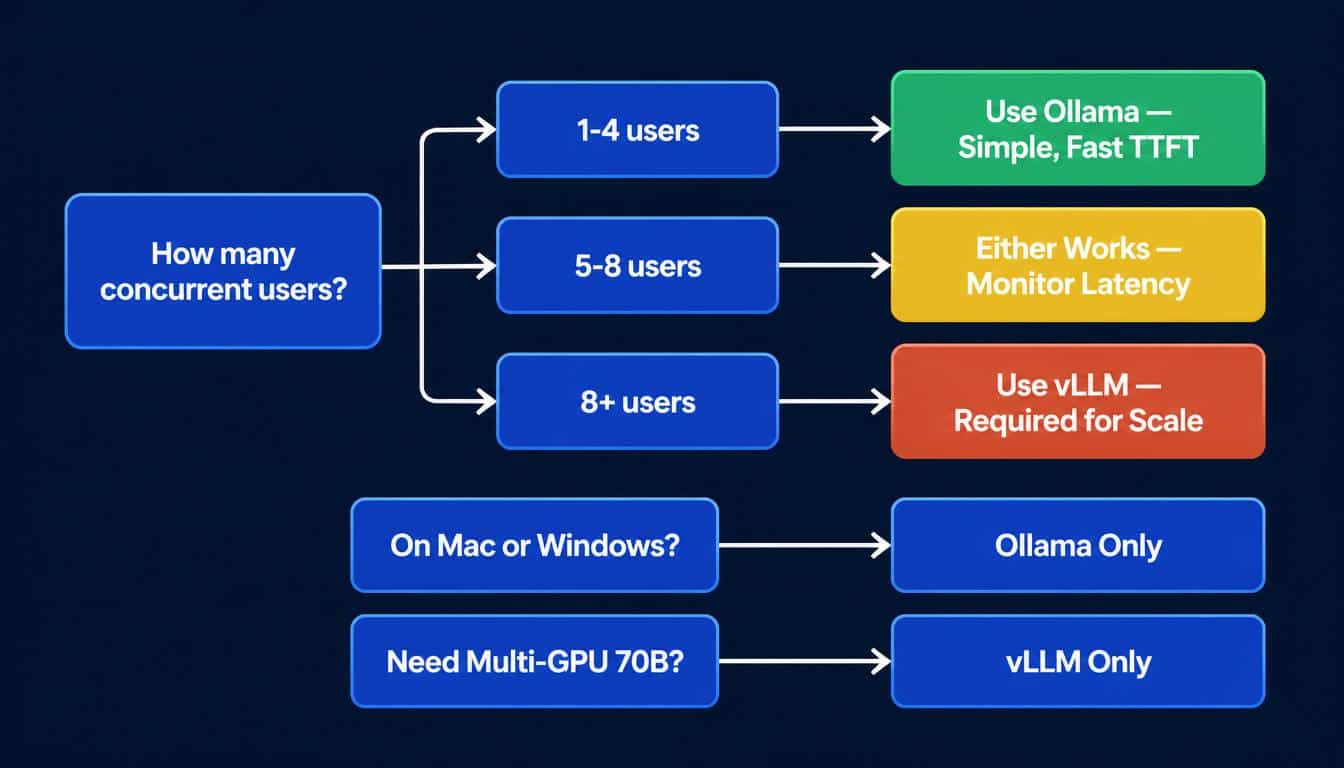
The practical decision boundary is not 128 concurrent users — it is far lower. As runaihome.com’s 2026 concurrency analysis documents, the cliff between “Ollama is adequate” and “vLLM is necessary” sits at approximately 4–8 sustained concurrent requests. Below that threshold, Ollama’s lower setup complexity, better single-user latency, and broader platform support make it the more practical choice. Above it, vLLM’s continuous batching and PagedAttention deliver throughput improvements that compound directly into infrastructure cost savings. For a deeper analysis of how hardware architecture affects inference throughput at the component level, the GPU vs CPU inference guide for local LLM workloads covers the memory bandwidth constraints that both tools operate within.
When Should You Use Ollama?
Local Development and Model Exploration
Ollama’s primary advantage is the time from intent to running inference: five minutes from a blank terminal to a model generating tokens. For developers building prototypes, testing model behaviour, or integrating local LLM calls into a new application, that setup speed has significant practical value.
The model library covers all major open-source models with pre-configured quantisation variants. The ollama pull model-name workflow mirrors Docker’s image management, making it intuitive for developers already familiar with container tooling.
Single-User and Low-Concurrency Workflows
Any workload serving one to three concurrent users consistently falls within Ollama’s performance envelope. This includes personal coding assistants, individual developer tools, small team internal bots where requests do not overlap, and CI/CD pipeline integrations that trigger inference on code commits — typically one request at a time. For these workloads, Ollama’s lower latency at batch size one produces a more responsive experience than vLLM’s higher-overhead architecture.
Apple Silicon and Windows Deployments
As of July 2026, vLLM’s Apple Silicon support exists only through the experimental vllm-mlx fork. Production-grade serving on Apple M-series hardware — M2, M3, and M4 — remains Ollama territory. Ollama uses Apple’s Metal framework through llama.cpp, accessing the Neural Engine and unified memory pool efficiently on all M-series processors.
On Windows, vLLM does not run natively. Windows developers and Windows-based servers must use Ollama, LM Studio, or a WSL2 Linux environment. This platform constraint alone makes Ollama the default choice for any Windows-first infrastructure. For a comparison of how the NPU inside Apple Silicon and dedicated GPU hardware handle inference workloads differently, the NPU vs GPU local AI hardware guide covers the architectural distinctions in detail.
GDPR and Data Compliance Workflows
For UK and EU developers processing regulated data, Ollama’s systemd service generates audit-compatible request logs, supporting GDPR data processing record requirements. Ollama also runs entirely offline after initial model download, eliminating any network-layer data exposure. This matters particularly for organisations operating under the EU AI Act provisions that began applying to general-purpose AI systems in August 2026. For US organisations under HIPAA or financial data regulations, the same offline-first architecture applies.
When Must You Switch to vLLM?
Production APIs Serving Five or More Concurrent Users
The clearest signal that Ollama has reached its limit is response time degradation under concurrent load. When a shared team model begins queuing requests visibly — users notice the second and third requests taking significantly longer than the first — the workload has crossed Ollama’s effective concurrency ceiling.
At this point, vLLM’s continuous batching architecture processes all concurrent requests in the same forward pass, maintaining consistent latency regardless of queue depth. As Spheron’s production deployment analysis documents, at 20 concurrent users, Ollama queues 19 of them while vLLM batches all 20 simultaneously — the difference in p99 latency is substantial enough to affect end-user experience directly.
Multi-GPU Deployments for Large Models
Ollama does not support tensor parallelism across multiple GPUs. Running a 70B parameter model in production requires either fitting it on a single GPU with FP8 quantisation — which demands an H100 80GB — or distributing the model across multiple GPUs using tensor parallelism. vLLM handles multi-GPU distribution via its Ray backend and has supported this configuration since 2024. For teams running Llama 3.3 70B or Qwen3 72B in production, vLLM is the only viable open-source option between the two tools. For a comprehensive overview of which models and hardware tiers match for local inference, the best local LLM hardware guide maps the full spectrum from consumer GPUs to multi-GPU workstations.
SLA-Bound Systems Requiring Predictable Tail Latency
Ollama’s head-of-line blocking means tail latency — the response time experienced by the slowest request in a batch — grows unpredictably under concurrent load. Red Hat’s engineering benchmark found Ollama’s inter-token latency becoming erratic at higher concurrency levels, an effect they attributed directly to the sequential request architecture. vLLM’s PagedAttention manages KV cache in non-contiguous memory pages, maintaining stable tail latency across concurrency levels because no single request can stall the entire scheduling queue.
For internal tools or developer-facing products where response time consistency matters more than peak throughput, this predictability difference is often more important than the raw tokens-per-second comparison.
How to Migrate From Ollama to vLLM in One Afternoon
The migration path is straightforward because both tools expose identical OpenAI-compatible API surfaces. Application code changes are minimal in almost every production scenario.
Step 1 — Install vLLM on Linux
bash
pip install vllmFor NVIDIA GPU support, ensure driver version 525 or above is installed. vLLM bundles the necessary CUDA libraries — a separate CUDA toolkit installation is not required in most configurations.
Step 2 — Start the vLLM Server
bash
vllm serve meta-llama/Llama-3.3-8B-Instruct \
  --tensor-parallel-size 1 \
  --host 127.0.0.1 \
  --port 8000
For multi-GPU deployments, adjust --tensor-parallel-size to match GPU count.
Step 3 — Update One URL in Application Code
python
# Before (Ollama)
client = OpenAI(
    base_url="http://localhost:11434/v1",
    api_key="ollama"
)

# After (vLLM)
client = OpenAI(
    base_url="http://localhost:8000/v1",
    api_key="EMPTY"
)
Model name references may require updating from Ollama’s short-form tags (llama3.3:8b) to HuggingFace model identifiers (meta-llama/Llama-3.3-8B-Instruct). This is the most common source of migration friction in practice.
Step 4 — Consider Model Format
Ollama uses GGUF quantised models by default. vLLM defaults to FP16 — higher precision, more VRAM, and better concurrent throughput. vLLM also supports GGUF via its llama.cpp backend, allowing direct reuse of existing downloaded model files if disk space or download time is a concern. For context on how these model format decisions affect hardware requirements, the best local edge AI models for software developers guide covers quantisation tradeoffs across different deployment scenarios.
Does vLLM Use More VRAM Than Ollama?
GPU memory consumption at equivalent model precision is nearly identical. Running Llama 3.3 8B in FP16, Ollama consumes approximately 16.5GB of VRAM versus vLLM’s 17.2GB — a difference of under 5%. vLLM’s FP8 quantisation option reduces memory to approximately the same level as Ollama’s GGUF Q4_K_M, while maintaining 3–4× higher concurrent throughput. The VRAM difference between the two tools is therefore not a meaningful factor in hardware selection decisions.
What does differ meaningfully is KV cache memory usage under load. vLLM’s PagedAttention allocates KV cache in pages rather than reserving contiguous blocks per request, which means vLLM can sustain far more concurrent sequences before hitting out-of-memory errors. On an H100 80GB serving Llama 3.1 8B, vLLM can sustain approximately 180 concurrent FP16 requests before OOM. Ollama reaches out-of-memory around 40 concurrent requests — less than a quarter of vLLM’s ceiling on the same hardware.
Frequently Asked Questions
Is vLLM faster than Ollama for local LLM inference?
It depends on concurrency. At one concurrent user, Ollama is faster on time-to-first-token (45ms vs 82ms). At 8 concurrent users, vLLM achieves 2.3× higher throughput. At 128 concurrent requests, vLLM is 3.23× faster and Ollama begins producing errors. The threshold where vLLM becomes necessary sits at approximately 4–8 sustained concurrent requests.
Does vLLM work on Windows or Apple Silicon?
No on both counts as of July 2026. vLLM runs on Linux with NVIDIA GPUs only. Apple Silicon support exists through the experimental vllm-mlx community fork but is not production-ready. Windows developers must use Ollama, LM Studio, or run vLLM inside WSL2.
How long does migrating from Ollama to vLLM take?
One afternoon in most cases. Both tools use OpenAI-compatible APIs — the application code change is updating one base URL and potentially updating model name references from Ollama’s short-form tags to HuggingFace model identifiers. Docker Compose configurations require minimal adjustment.
Does Ollama support running models across multiple GPUs?
Not natively. Ollama does not support tensor parallelism across multiple GPUs. Running 70B+ parameter models in production requires vLLM, which distributes model weights across multiple GPUs via its Ray backend.
Which tool uses less VRAM — vLLM or Ollama?
At equivalent precision, nearly the same: Ollama uses 16.5GB and vLLM uses 17.2GB for Llama 3.3 8B in FP16. With vLLM FP8 quantisation, memory consumption matches Ollama’s GGUF Q4_K_M level while maintaining significantly higher concurrent throughput.
What to Do Next
Three scenarios with a clear next step for each:
Serving fewer than 5 concurrent users: Stay on Ollama. Optimise your current setup — the LM Studio vs Ollama comparison covers which tool fits different developer workflows and how to configure Ollama for maximum single-user performance.
Hitting response time degradation under team load: Benchmark your concurrency level first. Run ollama ps and monitor active requests during peak usage. If sustained concurrency exceeds 5–8 requests, begin the vLLM migration. Check your GPU VRAM headroom using the hardware tiers in the GPU vs CPU inference guide before choosing between FP16 and FP8 serving configurations.
Planning a production API from scratch: Start with vLLM on Linux from day one. The setup overhead of 30–60 minutes pays back immediately at the first concurrent load spike, and the migration from Ollama to vLLM is a one-afternoon task — the reverse is true as well.
Conclusion
The vLLM versus Ollama decision is a concurrency question, not a quality or intelligence question. Both tools run the same models, expose the same API surface, and produce identical output quality on identical model files.
Three decisions define the correct choice:
First: how many concurrent users does your workload serve simultaneously? Below five, Ollama’s simplicity and lower single-user latency make it the better tool. Above eight, vLLM’s PagedAttention and continuous batching deliver throughput gains that compound directly into cost and reliability improvements.
Second: what platform are you deploying on? Apple Silicon and Windows constrain the choice to Ollama regardless of concurrency requirements.
Third: do you need multi-GPU tensor parallelism for 70B+ models? If yes, vLLM is the only viable open-source option.
The benchmark numbers are now clear enough that neither tool requires a leap of faith. Match the architecture to the concurrency profile, and the correct choice follows directly from the data.

Hammad Ahmed is a technology blogger and Computer Engineering student who writes about AI, software, hardware, cybersecurity, and emerging technologies. At TechInfort, he focuses on delivering clear, practical, and research-driven content that helps readers stay informed about the latest developments in the tech industry.